Before you start
Everything runs on your own PC: your prompts, images and LoRAs never leave it.
- An NVIDIA RTX card (30, 40 or 50 series). It is optimal with 16 GB of video memory: every number on this page was measured on an RTX 5080 16 GB, and every model we tested fits in it. Cards with 8 or 12 GB were not tested. The lightest variants (Flux 2 Klein 4B, the GGUF versions of Flux 2 Klein 9B, Flux 2 Dev and Qwen-Image), whose measured peak stays under 8 GB, may run on them — not certified. There is no CPU mode.
- Windows 10 or 11, 64-bit, with the free .NET 8 Desktop Runtime (Windows offers it the first time if it is missing).
- 64 GB of system memory on our test PC. The big models (Flux 2 Dev, Krea 2, HiDream, Wan 14B, HunyuanVideo) keep their weights in system memory and send them to the card layer by layer: while one loads, it can use 25 to 40 GB of it. Close other heavy programs before a big render; the bar at the bottom of the window shows the memory in use. 32 GB was not tested.
- Disk space: about 7 GB for the app's Python environment, plus each model you download — from about 2 GB (Flux 2 Klein 4B in GGUF, plus its text encoder on the first render) to about 117 GB (Wan 2.2 A14B). The size of every model is shown on its row before you download it. You pick the models you want — one or two are enough to start; the whole list together weighs about 1.5 TB (1,463 GB measured), one of the reasons why the next ExpSoft apps will be made one per model. Everything stays inside the app's folder; a fast SSD makes the first load of the big models much quicker.
- A free Hugging Face account and token only for the gated repositories (Flux 1 Dev, Flux 2 Dev, Flux 2 Klein 9B, HiDream): accept the licence on the model's page first. The others download without an account.
What is new in 1.1
- The full model list, free: Flux 1 Dev, Flux 2 Dev and Klein (4B and 9B), Krea 2 Turbo and Raw, HiDream, Qwen-Image, Z-Image, Wan 2.1 and 2.2 (text, image and first-and-last-frame to video), HunyuanVideo, SDXL and SD 1.5 — with GGUF and fp8 variants that need much less video memory.
- Every model checked on a 16 GB card, with the speeds and memory peaks below — including the LoRAs trained in DiffusionForce 1.1.
- Fixes: SDXL and SD 1.5 images came out washed-out (nearly grey) — fixed; a Wan image (one frame) was computed as a full clip, many times slower — fixed; LoRAs now work on the memory-saving (GGUF / fp8) versions of the families DiffusionForce trains — Wan 2.1, Qwen-Image, Z-Image, Flux 1 Dev, Flux 2 Dev and Flux 2 Klein — where they gave black images, errors or were ignored; the app no longer spills into system memory when the card is full (it used to slow down to a crawl); the Flux 2 Klein fp8 and GGUF variants can now be picked in Run; Download fetches only the files a model needs, and shows the real size.
- Far less system memory: a GGUF model is now read from its file as the render needs it instead of being copied into memory first, and the text encoders are released as soon as the prompt is encoded. Measured with Flux 2 Dev (GGUF Q5): the render process went from about 50 GB to about 2 GB during the render, same image to the pixel, slightly faster.
- A live hardware bar at the bottom of the window, on every tab: processor load, system memory, and for each graphics card its memory, load, temperature and power draw.
The window at a glance
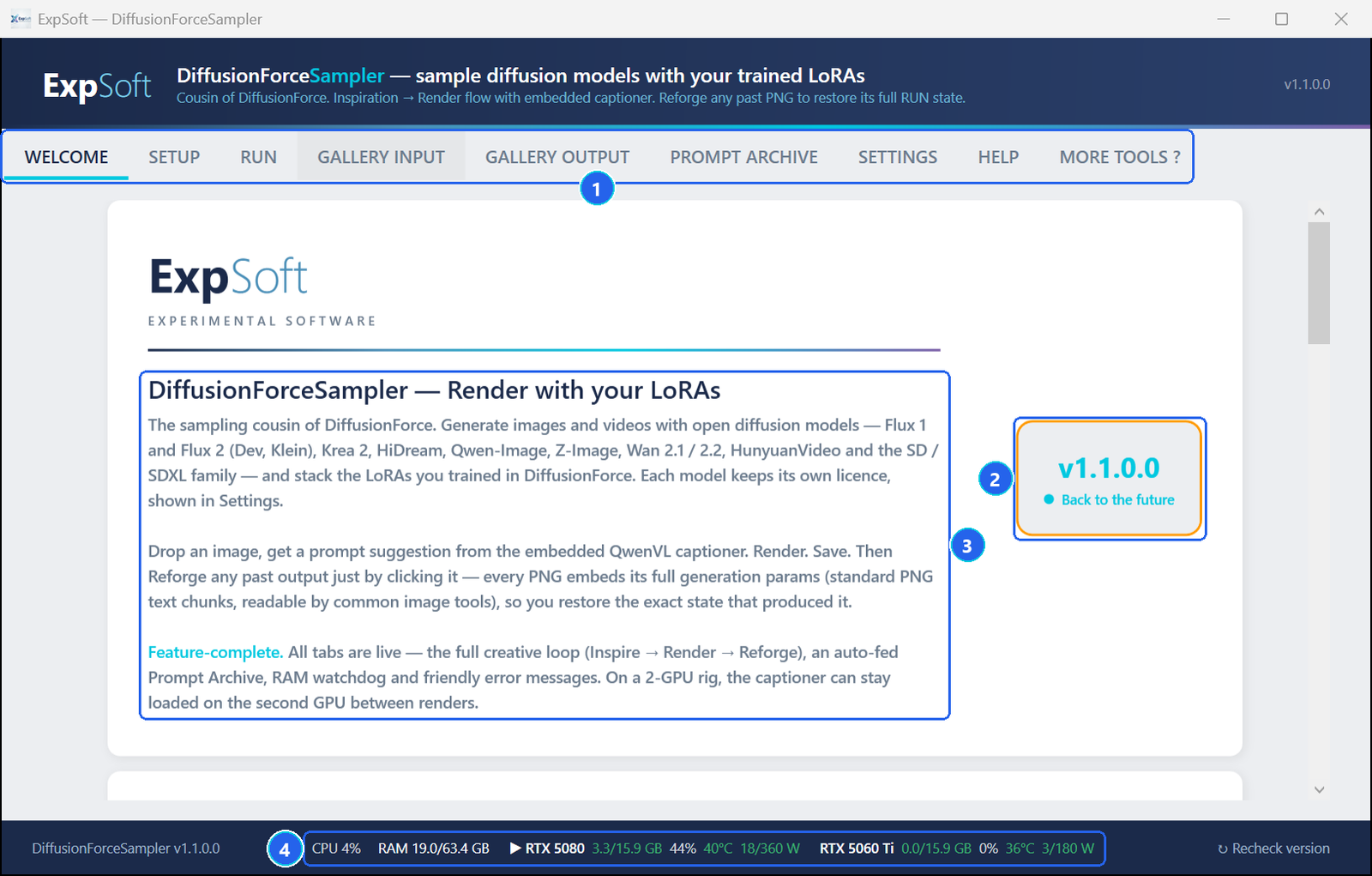
- 1The tabs — Setup, Run, Gallery Input, Gallery Output, Prompt Archive, Settings, Help, More Tools.
- 2Version — and whether a newer one is available.
- 3What the app does — further down the tab: the three key features, what lives where, and the licences of everything it uses.
- 4The hardware bar, on every tab — processor load, system memory, and for each graphics card its memory, load, temperature and power draw (▶ = the card that renders). A value turns amber, then red, near its limit.
Install
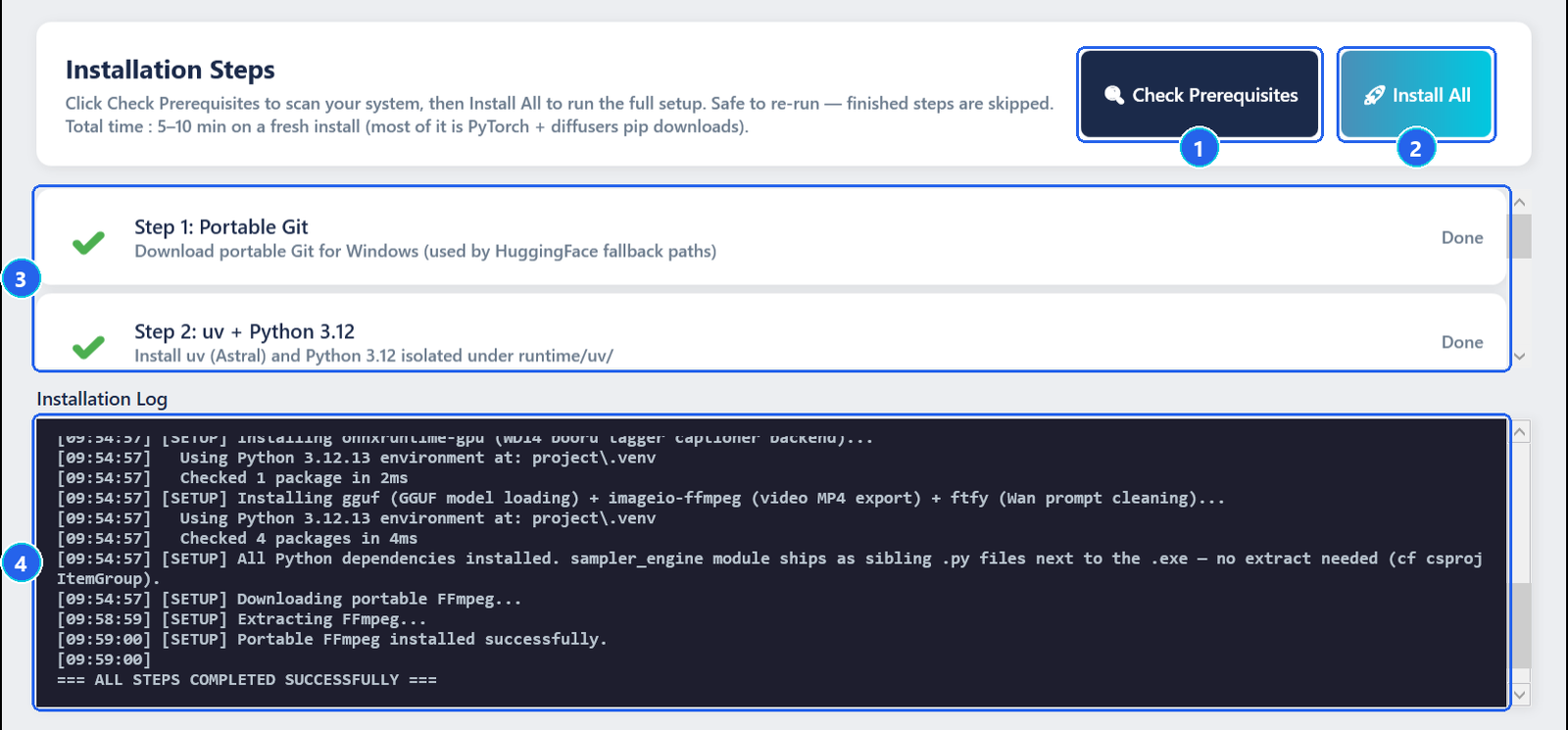
- 1Check Prerequisites — scans your PC, installs nothing.
- 2Install All — five steps: a portable Git, a portable Python, the GPU check, the Python environment (PyTorch and the diffusion libraries), and a portable FFmpeg for the videos. A step already done is skipped next time.
- 3The steps — a green tick means done.
- 4The log — every step in plain words.
On our test PC, Install All took a few minutes on a fast connection. If a download stops receiving data for 30 seconds, the app tries again by itself (three tries). The models come next, in Settings.
Download a model
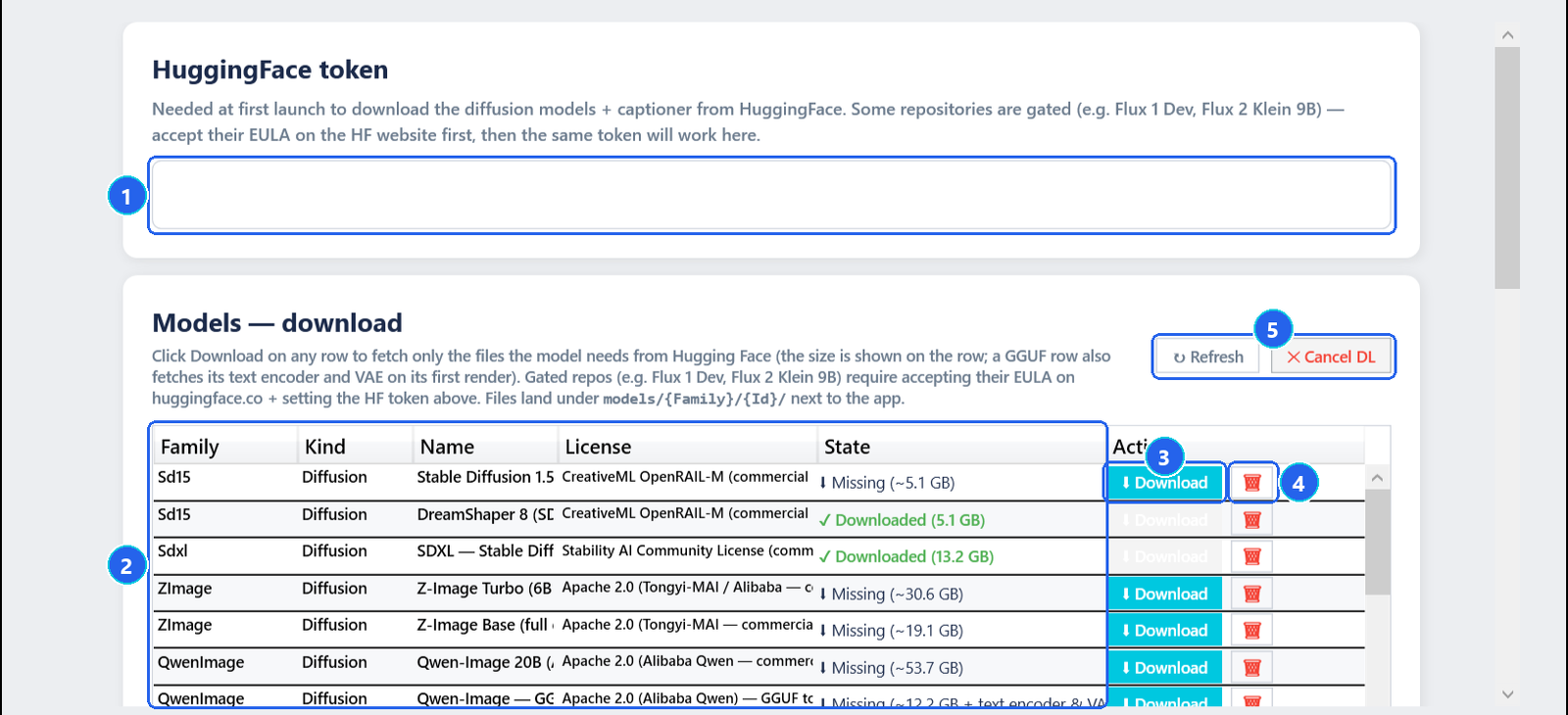
- 1Hugging Face token — only for the rows marked Gated.
- 2The models — family, kind (image / video model or captioner), licence, and state: Missing (~ size) or Downloaded (size on disk).
- 3Download — fetches only the files the model needs into
models\. Progress shows in the log under the list. - 4Delete — frees the disk.
- 5Refresh the states, Cancel DL a running download.
A GGUF or fp8 row holds only the main network of the model, much smaller; its text encoder and its decoder come from the model's original repository the first time you render with it (or from that full model, if you downloaded it). Good first choices: Flux 2 Klein 4B or SDXL for images, Wan 2.2 TI2V-5B for videos (31.9 GB). The captioner of the next sections, QwenVL 3B, downloads itself the first time you use it: you do not need its row of the list. Further down the tab: the captioner defaults and the graphics card it uses.
Render
Open Run. It is laid out in six numbered steps, top to bottom.
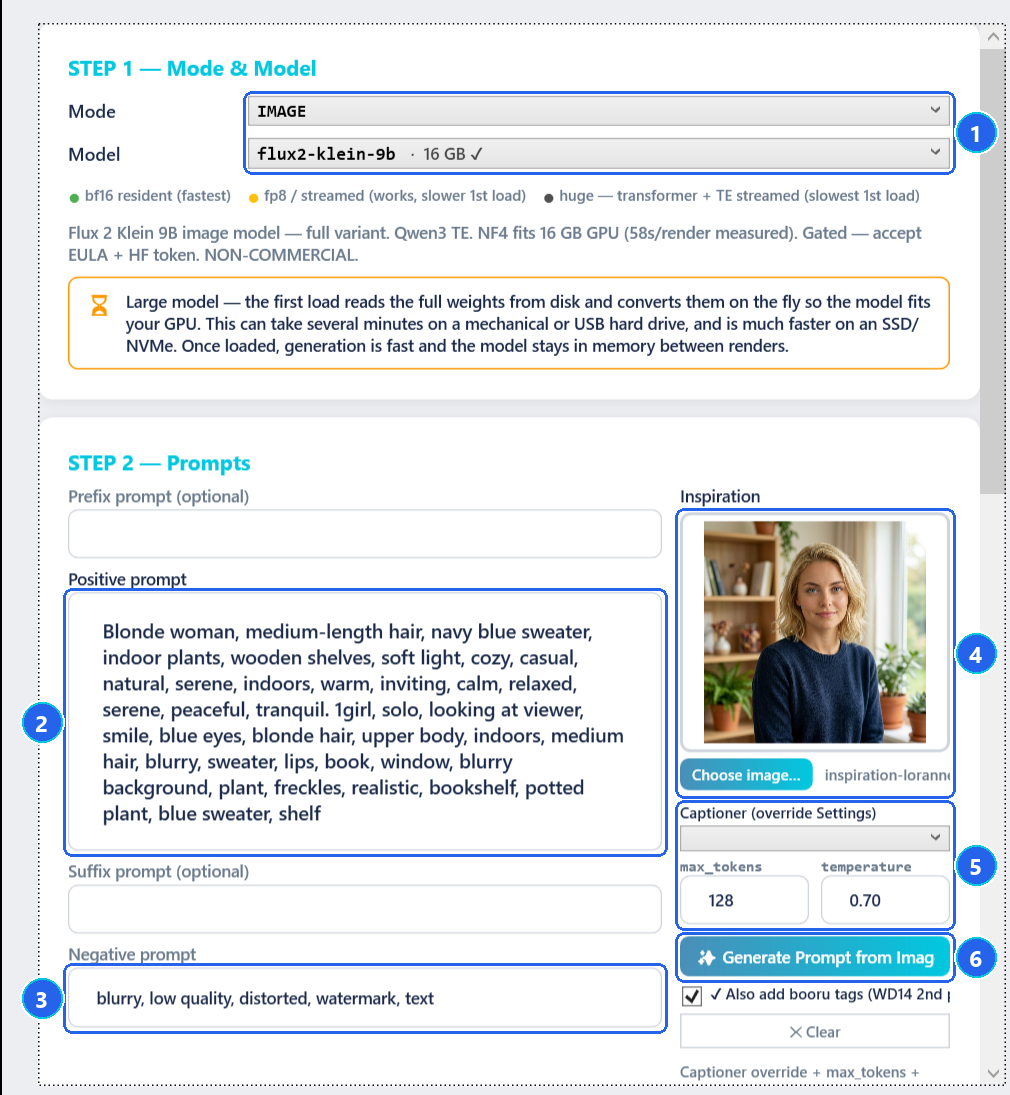
- 1Mode and Model — IMAGE or VIDEO, then a model you downloaded. The colour dot says how it will load on your card: green resident (fastest), yellow fp8 / streamed, grey streamed in full (slowest first load).
- 2Positive prompt — what you want. Optional prefix and suffix wrap it.
- 3Negative prompt — what you do not want.
- 4Inspiration — drop an image here, or Choose image…
- 5Captioner, max tokens, temperature — for this render only.
- 6Generate Prompt from Image — writes the positive prompt from the image (see From an image to a prompt).
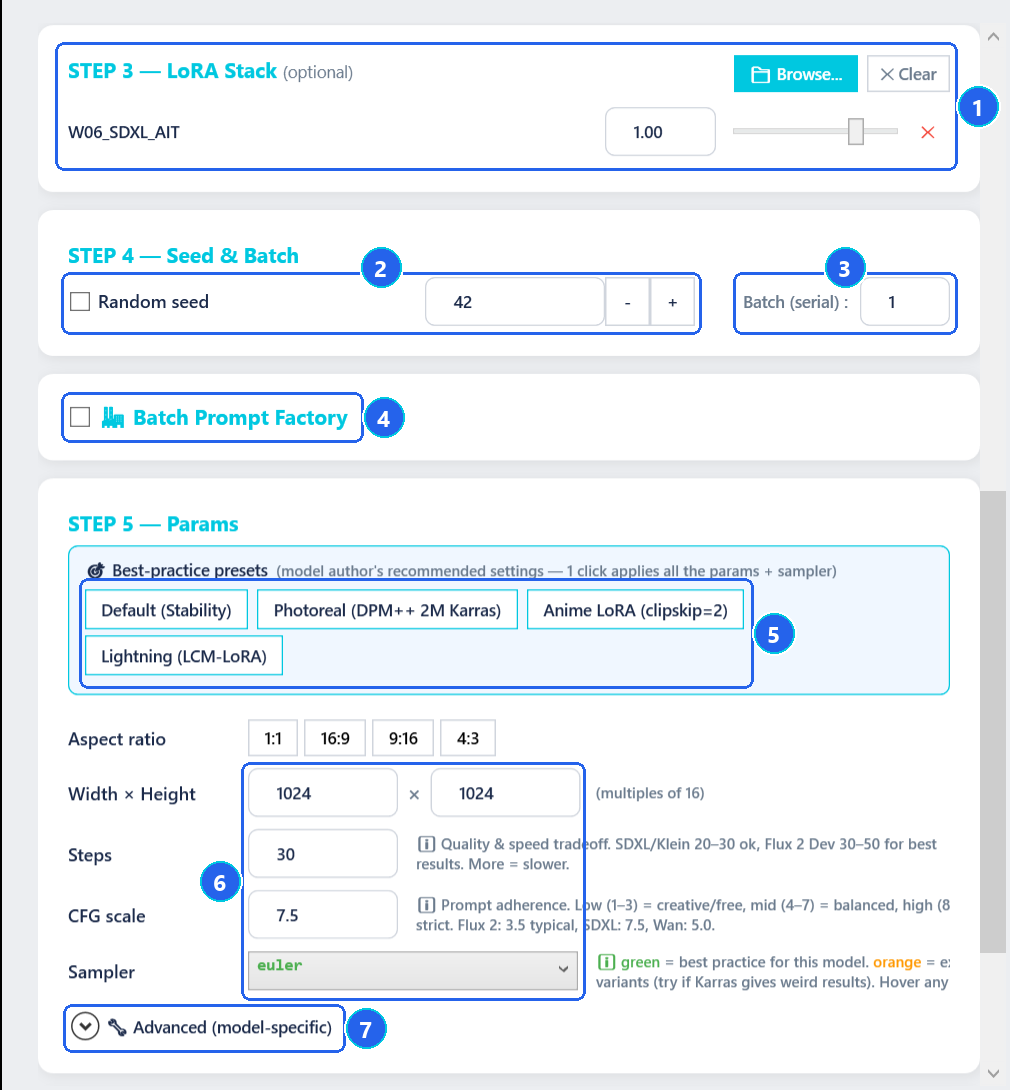
- 1LoRA Stack — add your LoRAs (see below).
- 2Seed — untick Random seed to fix it; − / + step to the neighbouring seeds.
- 3Batch — renders in a row, one after the other.
- 4Batch Prompt Factory — drop text files of prompts and render them all.
- 5Best-practice presets — the model author's recommended settings in one click.
- 6Size, steps, guidance (CFG), sampler — the sampler list shows in green the ones recommended for the model.
- 7Advanced — the extra settings of the selected model, when it has some.
Step 6, below: an Output name — files land in output\<date>\ as name_time_seedN.png — and RENDER (and Cancel). The result appears in Last render on the right, with the live log.
The example of this page — model SDXL with a LoRA of the author trained in DiffusionForce (trigger word Wodk), prompt:
Wodk, photograph, close-up portrait of a man as a lumberjack in a snowy forest, plaid shirt, face clearly visibleNegative prompt: blurry, deformed, lowres · 1024 × 1024 · 30 steps · CFG 7.5 · Euler · seed 42 (the Default (Stability) preset, with the seed fixed) · LoRA strength 1. About 30 seconds on our test PC.
Reforge
Every PNG keeps, inside the file, the prompt, the seed, the model, the LoRAs and every setting that made it. Gallery Output lists your renders; select one and click Reforge → RUN: the Run tab comes back exactly as it was.
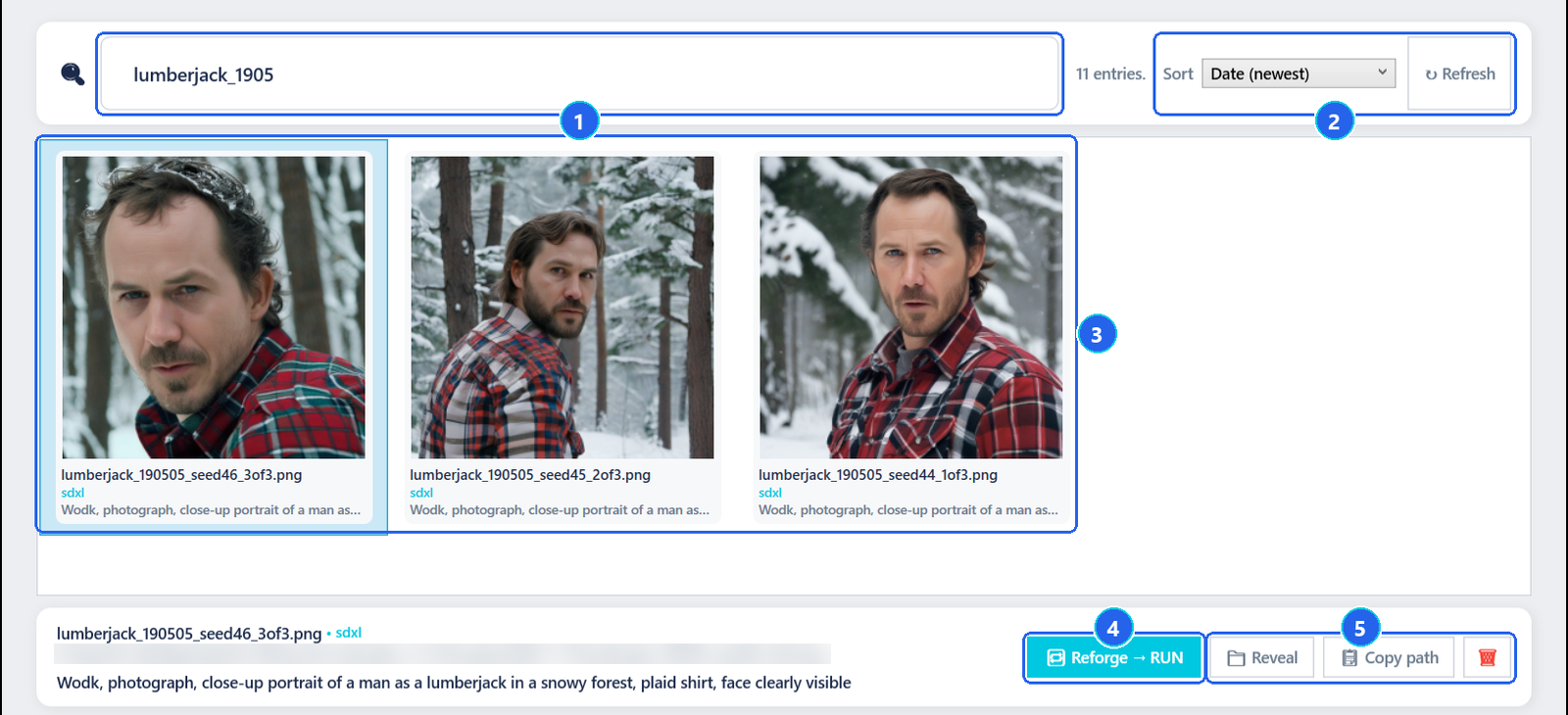
- 1Search — in prompts, model names and file names.
- 2Sort and Refresh.
- 3Your renders — images and videos, with model and prompt.
- 4Reforge → RUN — restores the Run tab from the file.
- 5Reveal in Windows Explorer, Copy path, Delete.
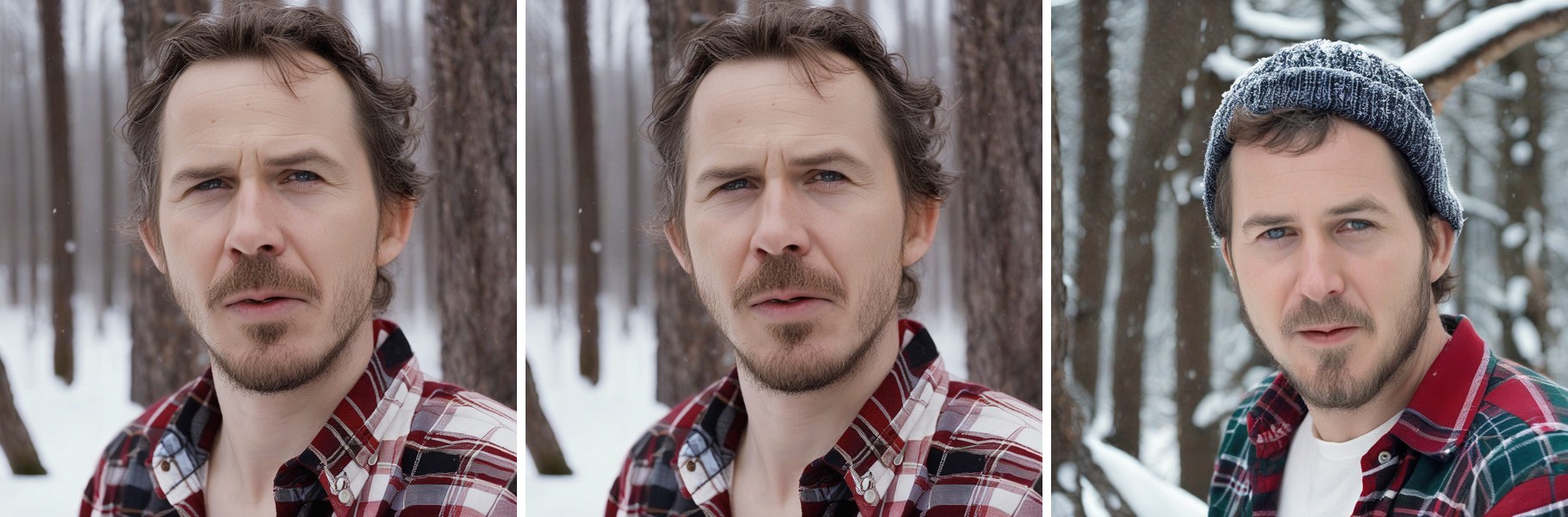
That is the loop the app is built for: keep the image you like, Reforge it, change one thing — the seed, a word, the number of steps — and compare.
From an image to a prompt
Put an image in Inspiration (drop it, or Choose image…) and click Generate Prompt from Image: the captioner describes it and writes the positive prompt. Edit it, then render. The image and its caption are kept in Gallery Input (with Reuse in RUN), and every generated prompt goes to the Prompt Archive, where you can search it, star it and use it again.
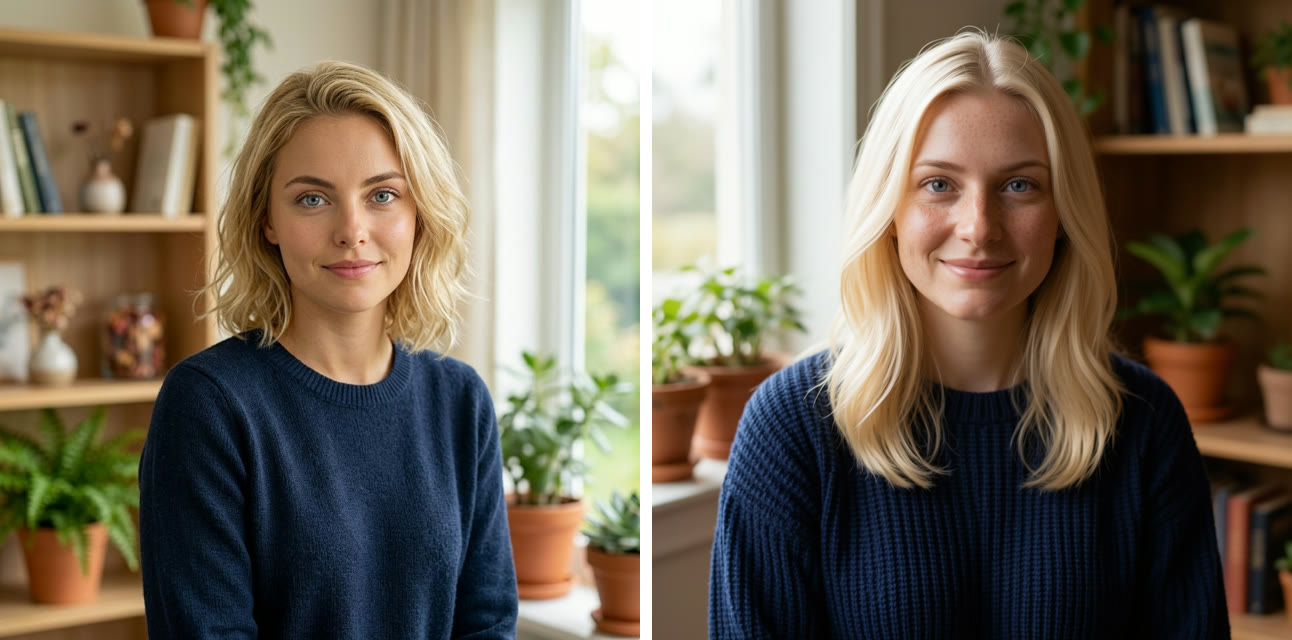
Blonde woman, medium-length hair, navy blue sweater, indoor plants, wooden shelves, soft light, cozy, casual, natural, serene, indoors, warm, inviting, calm, relaxed, serene, peaceful, tranquil. 1girl, solo, looking at viewer, smile, blue eyes, blonde hair, upper body, indoors, medium hair, blurry, sweater, lips, book, window, blurry background, plant, freckles, realistic, bookshelf, potted plant, blue sweater, shelfThe caption above, exactly as the default captioner wrote it in 42 seconds (QwenVL 3B, then tags added by the second pass). The very first caption takes longer: the captioner downloads and prepares itself. On a PC with two graphics cards, the captioner goes to the second card by default and stays loaded between renders; you can change that in Settings (GPU policy).
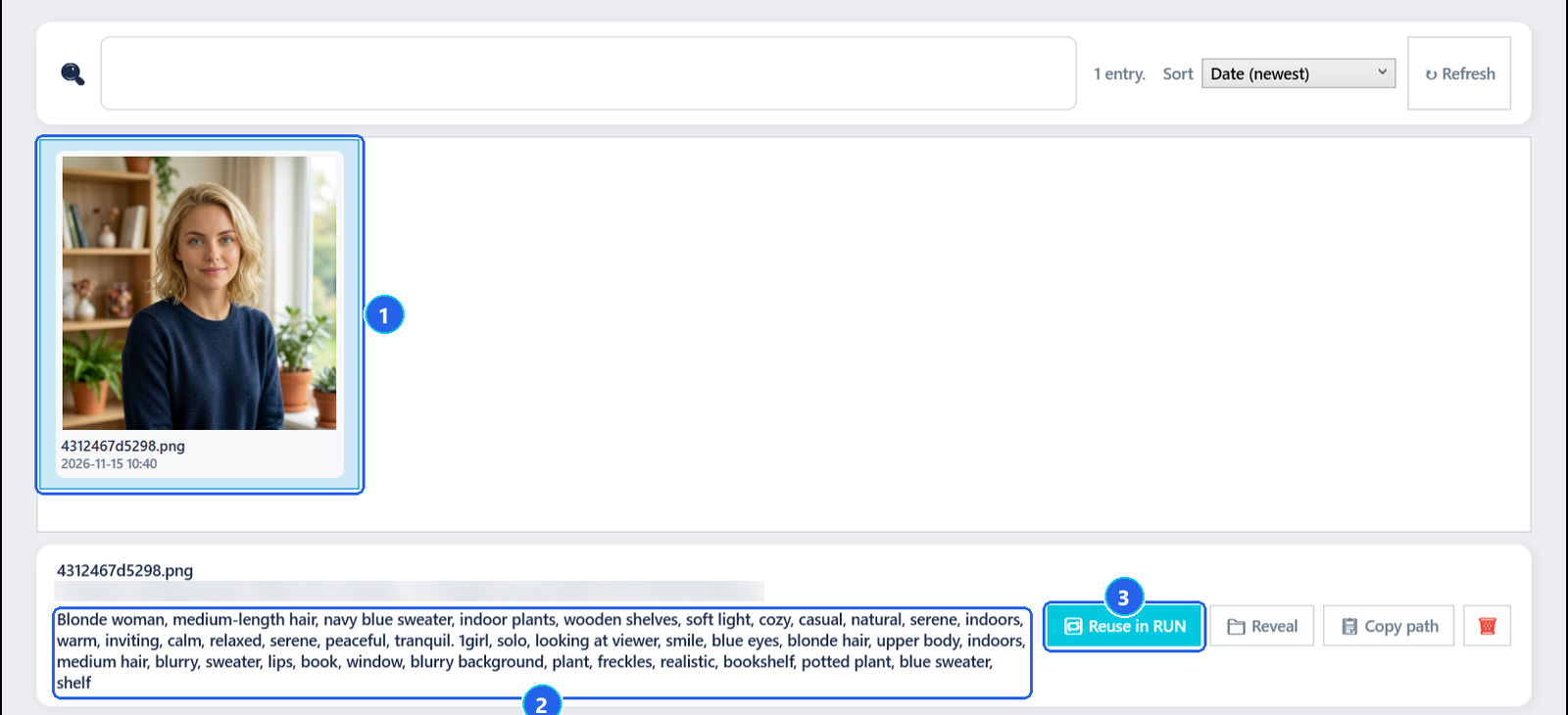
- 1The inspiration images you used.
- 2The caption written for the selected one.
- 3Reuse in RUN — sends the image back to Inspiration.
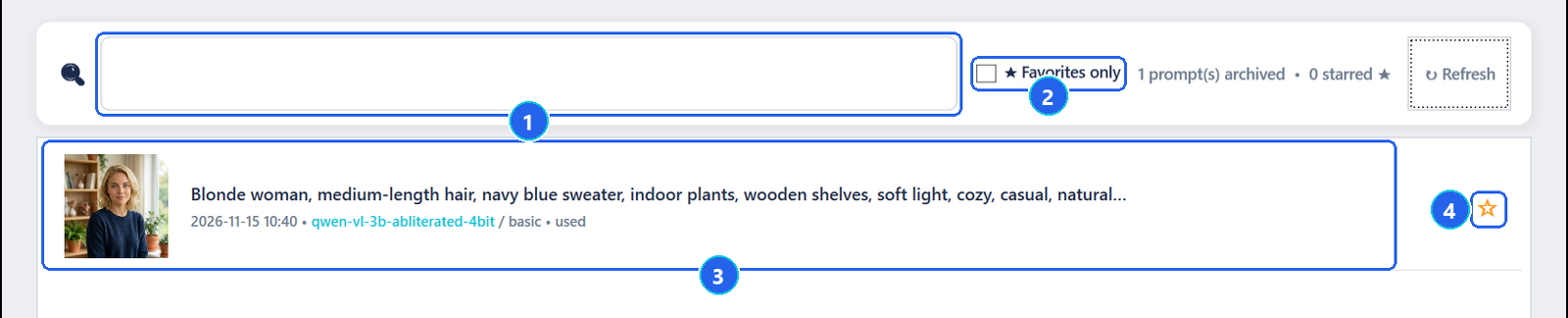
- 1Search.
- 2Favorites only.
- 3An archived prompt, with its date and the captioner that wrote it.
- 4Star it.
Short videos
Set Mode to VIDEO and pick a video model. Step 5 then shows Frames (a multiple of 4 plus 1: 49, 81…) and FPS, and the presets offer 3-second and 5-second clips. The video is saved as an MP4 in the same output folder. The image-to-video models (Wan 2.1 I2V, Wan 2.2 I2V) ask for a first image, and the first-and-last-frame model (Wan 2.1 FLF2V) for a last one too. They are the slowest of the list: on our test PC, Wan 2.2 I2V took about 41 minutes for a 2-second clip, and a face can lose its shape during a large movement (a head turning) — keep the motion gentle in the prompt. On our test PC, Wan 2.1 I2V at 480p gave the cleanest clips; the 720p model rendered but, with only 20 steps (our quick test), the face fell apart after a few frames — keep its recommended steps (more steps were not tested at 720p). For the first-and-last-frame model, pick two pictures of the same scene, close to each other: between two very different pictures (other clothes, other framing) the frames in between become a blurry blend. The first time you use a big video model, its load takes much more system memory than the next times (the app prepares a faster copy of it on your disk once).
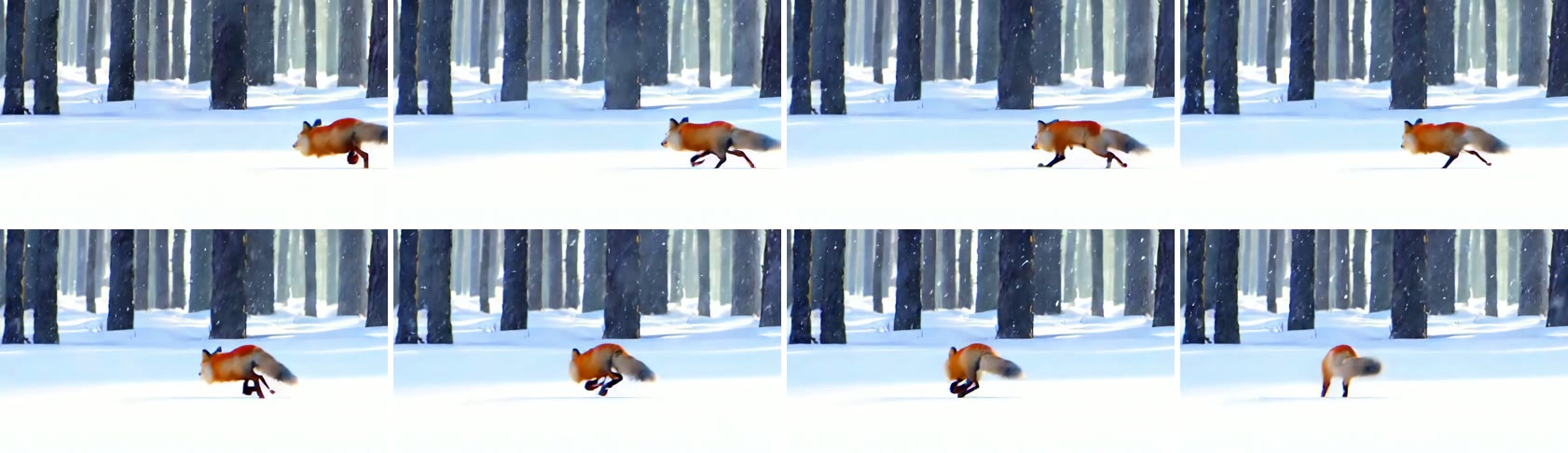
a red fox trotting through fresh snow in a pine forest, soft morning light, gentle snowfall, the camera slowly follows the fox, cinematic, detailed furSettings: Wan 2.2 TI2V-5B (video), 832 × 480, 49 frames at 16 FPS, 50 steps, CFG 5, UniPC, seed 42 (the Video 3sec preset, landscape). 3 min 49 s on our test PC from the click to the MP4, model loading included (2.1 s per step).
Your DiffusionForce LoRAs
In Run, step 3, click Browse… and pick a .safetensors LoRA trained in ExpSoft DiffusionForce: it loads as it is, with no conversion. Each LoRA of the stack has its own strength slider, from −2 to +2. Pick a LoRA trained for the same model family as the selected model; the LoRA travels with the image, so Reforge brings it back too.
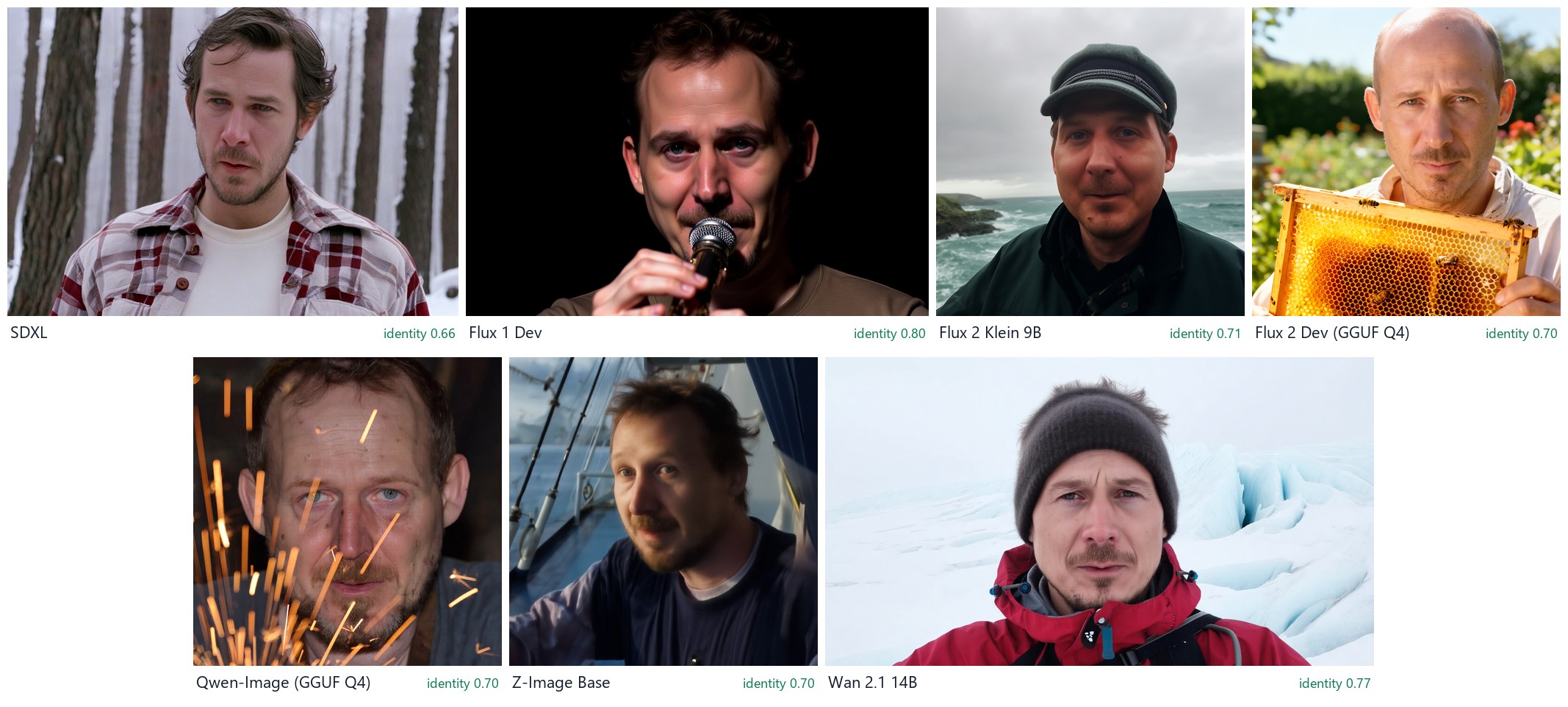
Training previews look weaker than this. In DiffusionForce, the previews made during training only check that the LoRA moves and starts to learn. Rendered here, at the model's full settings, the same LoRA gives much stronger features: on our test PC, the author's face was clearly more recognisable in these renders than in the training previews. A subject that starts to appear in a preview is a good sign.
Tested with a LoRA on our test PC: SDXL, Flux 1 Dev (full and GGUF), Flux 2 Klein 9B (full, fp8 and GGUF), Flux 2 Dev (GGUF), Qwen-Image (full and GGUF), Z-Image Base and Turbo, Wan 2.1 14B (full and GGUF Q4 to Q8, images and video). The lighter versions keep the LoRA as well as the full ones: Flux 1 Dev GGUF Q8 scored 0.70 like the full model, Flux 2 Klein 9B scored 0.72 in fp8 and 0.68 in GGUF Q4.
How fast is it?
Measured on our test PC: RTX 5080 with 16 GB of video memory, 64 GB of system memory, each model at its recommended settings (the preset of the model). One render is the whole job, from the click to the file, model loading included; it varies with your disk, so the time per step tells more. Card peak is the most memory used on the whole card, the Windows desktop included (about 1.5 GB). Your card will give other numbers.
| Model | Size · steps | Time per step | One render | Card peak |
|---|---|---|---|---|
| SD 1.5 / DreamShaper 8 | 512 × 768 · 28 | 0.06 s | 14 s | 3.4 GB |
| SDXL | 1024² · 30 | 0.17–0.22 s | 30 s | 8.5–10.8 GB |
| Z-Image Turbo | 1024² · 9 | 0.8 s | 31–44 s | 8.6–12.3 GB |
| Z-Image Base | 1024² · 50 | 1.7–1.8 s | 2 min 22 s – 3 min 31 s | 9.3–9.8 GB |
| Flux 2 Klein 4B | 1024² · 28 | 1.1 s | 95 s | 7.7 GB |
| Flux 2 Klein 4B (fp8 or GGUF) | 1024² · 28 | 1.7–1.9 s | 62–73 s | 2.9–3.5 GB |
| Flux 2 Klein 9B | 1024² · 28 | 2.1–2.3 s | about 2 min | 14.7–15.5 GB |
| Flux 2 Klein 9B (fp8 or GGUF Q4–Q8) | 1024² · 28 | 3.7–4.0 s | about 2 min 10 s | 5.0–7.4 GB |
| Flux 1 Dev | 1024² · 28 | 1.2–1.3 s | about 1 min 30 s | 12.4–15.5 GB |
| Flux 1 Dev (GGUF Q4–Q8) | 1024² · 28 | 2.2–2.5 s | about 1 min 30 s | 12.0–13.0 GB |
| Flux 2 Dev (GGUF Q4–Q8) | 1024² · 28 | 6.0–7.0 s | about 4 min | 4.5–7.8 GB |
| HiDream-I1 Fast | 1024² · 16 | 1.2 s | about 7 min (first load included) | 11.6 GB |
| HiDream-I1 Fast / Dev / Full (GGUF Q4) | 1024² · 16 / 28 / 50 | 2.9–3.9 s | 2 min 30 s – 5 min | 13.4–15.3 GB |
| Qwen-Image | 1024² · 50 | 5.7–5.9 s | about 6 min | 7.4–7.7 GB |
| Qwen-Image (GGUF Q4–Q8) | 1024² · 50 | 6.0–6.6 s | 6–8 min | 5.5–6.5 GB |
| Krea 2 Turbo | 1024² · 8 | 7.3 s | about 1 min of rendering, after the first load | 13.8 GB |
| Krea 2 Raw | 1024² · 52 | 14 s | about 12 min of rendering, after the first load | 13.9 GB |
| Wan 2.1 14B, one image | 832 × 480 · 30 | 4.1–4.6 s | about 3 min | 12.9–13.0 GB |
| Wan 2.1 14B, a 2-second clip (33 frames) | 832 × 480 · 30 | 21 s | about 12 min | 12.5 GB |
| Wan 2.1 14B (GGUF Q4–Q8), one image | 832 × 480 · 30 | 3.9–4.5 s | 3–4 min | 12.1–12.8 GB |
| Wan 2.2 A14B, one image | 832 × 480 · 30 | 3.8 s | about 5 min | 12.2 GB |
| Wan 2.2 TI2V-5B, a 3-second clip (49 frames) | 832 × 480 · 50 | 2.1 s | 3 min 49 s | 13.7 GB |
| Wan 2.2 TI2V-5B, a 3-second clip (49 frames) | 1280 × 704 · 50 | 5.6 s | 5 min 27 s | 15.0 GB |
| HunyuanVideo, one image | 960 × 544 · 30 | 0.5 s | about 4 min 20 s | 13.9 GB |
| HunyuanVideo (GGUF Q4–Q8), one image | 960 × 544 · 30 | 1.7–2.0 s | 3–5 min | 4.4–4.6 GB |
| HunyuanVideo, a 2.7-second clip (65 frames) | 960 × 544 · 20 | 31 s | 13 min 30 s | 11.9 GB |
| Wan 2.2 I2V A14B, a 2-second clip from an image (33 frames) | 832 × 480 · 30 | 78 s | about 41 min | 12.5 GB |
| Wan 2.1 I2V 480p, a 2-second clip from an image (33 frames) | 832 × 480 · 30 | 80 s | about 41 min | 13.9 GB |
| Wan 2.1 FLF2V 720p / I2V 720p, a 1-second clip (17 frames) | 1280 × 720 · 20 | about 1.8 min | 37–39 min | 14.0–14.3 GB |
| Generate Prompt from Image (QwenVL 3B + tags) | — | — | 42 s once installed | about 4.4 GB |
A LoRA adds 5 to 15 % to the time per step. The first render of a big model reads it from your disk and prepares it; the next renders of the session are faster. Higher sizes measured too: Flux 1 Dev at 1536 × 1024 (2.0 s per step, 14.2 GB), Flux 2 Klein 9B at 1536² (5.9 s, 15.1 GB), Flux 2 Dev GGUF at 1440² (10.4 s, 12.4 GB), Qwen-Image GGUF at 1328² (8.3 s, 6.4 GB), Z-Image Base at 1536² (5.2 s, 11.7 GB), Wan 2.1 at 1280 × 720 (7.5 s, 12.3 GB).
Models and licences
- Stable Diffusion 1.5 / DreamShaper 8 — CreativeML OpenRAIL-M.
- SDXL — Stability AI Community License.
- Wan 2.1 / 2.2 (Alibaba), Qwen-Image (Alibaba Qwen), Z-Image (Tongyi-MAI) — Apache 2.0.
- Flux 1 Dev, Flux 2 Dev, Flux 2 Klein 4B / 9B (Black Forest Labs) — their non-commercial licences; Flux 1 Dev, Flux 2 Dev and Klein 9B are gated (accept the licence on Hugging Face).
- Krea 2 Turbo / Raw (Krea) — Krea 2 Community License: commercial use only under its revenue limit, with attribution and its content rules. By downloading the weights you accept it.
- HiDream-I1 Full / Dev / Fast — HiDream licence, plus the Meta Llama 3.1 licence for its text encoder (gated).
- HunyuanVideo (Tencent) — Tencent Hunyuan Community License.
- GGUF versions: conversions published by city96 and unsloth; the weights keep the licence of their model.
- Captioners: QwenVL (Qwen licence), WD14 taggers (Apache 2.0).
Every model is downloaded from its public repository when you click Download, never bundled with the app, and comes with its own licence: by downloading it you accept its terms. DiffusionForce Sampler is an independent application by ExpSoft, not affiliated with, endorsed or sponsored by the authors of these models.
Files the app writes
Everything stays in the app's folder; nothing goes to the Windows registry or the PATH.
runtime\— portable Git, uv, Python and FFmpeg;project\.venv\— the Python environment.models\<Family>\<model>\— the models you downloaded.output\<date>\— your renders (PNG or MP4), each with a.txtcaption next to it.galleries\input\— the inspiration images;prompt_archive\— the archived prompts.cache\— download and model caches (the big models keep a prepared copy there, so they load faster the next time);logs\.
Troubleshooting
A model will not download: "Gated"
That repository asks you to accept its licence on its Hugging Face page with your account. Accept it there, create a read token, paste it in Settings, then click Download again.
Out of video memory
Close the other programs that use the graphics card, lower the size or the number of frames, or use a lighter variant (GGUF or fp8; the colour dot next to the model says how it loads). The app keeps its work inside the card's memory instead of spilling into system memory, so a model that does not fit stops with an out-of-memory line in the log rather than slowing down for hours.
My LoRA has no effect
Check that it was trained for the same model family as the selected model (a Flux 1 LoRA on a Flux 1 entry, a Klein 9B LoRA on a Klein 9B entry…), and that its strength is not near 0. The log says how many parts of the model the LoRA reached (« N modules patched »).
Reforge says the PNG has no metadata
The image was made by another program, or re-saved by one that drops the text chunks of the PNG. Reforge works on the files the app saved, as they are.
The video frame count is refused
Video models need a multiple of 4 plus 1: 49, 81, 129… Use a preset to start from valid values.
The first render or caption is slow
The first time, the model is read from disk and prepared; the next renders of the session are much faster. A fast disk (NVMe) helps the most: a big model read from a busy USB drive took over ten minutes to load on our test PC.
Windows asks me to install .NET when I start the app
The app needs the free .NET 8 Desktop Runtime. Accept the download Windows offers, then start the app again.
Something went wrong. What should I send?
The newest file in logs\, next to the program, tells the whole story. Send it to ExpSoft with a word on what you did.