v1.1.0.2

ExpSoft Diarizer

Speaker diarization & audio splitting powered by pyannote.audio. Drop an audio file, get one track per speaker. Fully local, fully portable.

New version available!

What is speaker diarization?

The "who spoke when" problem, solved automatically.

You have an audio file with several people talking — an interview, a podcast, a meeting recording, a movie clip, a YouTube reaction, a lecture with Q&A. Speaker diarization is the AI task of figuring out, second by second, which speaker is talking at any given moment, and then bundling each speaker's contribution into its own clean audio track.

Drop a 30-minute podcast with 3 hosts → get back speaker_1.wav, speaker_2.wav, speaker_3.wav, each containing only that one person's lines (every other voice silenced). The split is based on voice signature (timbre, pitch, formants), not channel separation — it works on a single mono mix.

Headline use case — voice cloning for AI video

The problem. You're making an AI video where a specific person speaks — yourself, a public-domain figure, an actor whose voice you have license to use. To clone their voice with RVC / XTTS / OpenVoice / F5-TTS / your model of choice, you need 5 to 30 minutes of clean, single-speaker training data. The catch: the source material you have is almost never clean. It's an interview where someone else asks the questions. A podcast where two co-hosts overlap. A movie scene where the target speaks for 12 seconds before another character cuts in. A lecture with audience Q&A. A documentary voice-over with B-roll dialogue underneath.

The old workflow. Open Audacity, scrub through 30 minutes of audio, manually cut every segment where the wrong speaker talks, splice the rest back together. Two to three hours of tedious work per dataset. Any mistake contaminates the clone — one stray word from the wrong speaker and your AI character starts borrowing someone else's vowels.

The new workflow. Drop the file in ExpSoft Diarizer, set Number of speakers to "auto" (or pin it to 2/3/4 if you know), click Run. A few minutes later (real time on a 4060 Ti, ~5× real time on CPU) you have one .wav per speaker. Listen to each, identify your target, feed that single track to your voice-cloning trainer. Two hours of cleanup compressed to two minutes of compute.

Other use cases for AI video creators

👄

Lip-sync prep (Wav2Lip / SadTalker / Hedra / LatentSync)

Lip-sync tools assume one speaker. Multi-voice input confuses the timing model and produces glitchy mouths. Diarize first, feed only the target speaker's track.

🎬

AI dubbing — swap one voice, keep everything else

Replace one character's voice in a scene while preserving the other speakers and the ambient bed. Diarize, regenerate the target track only with your TTS / clone, mix back over the original.

📝

Speaker-labeled captions for shorts

Whisper transcribes but doesn't know who's talking. Combine its timestamps with diarization output to get "Host: … Guest: …" captions ready for TikTok / Shorts / Reels — the kind of fast-cut content where speaker changes need to be visible at a glance.

🎤

Podcast / interview post-production

Apply different EQ, compression and noise reduction per speaker independently. The target wears a Shure SM7B at home, the guest is on a Zoom call from a hotel room — you can only fix that asymmetry if their tracks are separated first.

🎧

Audio-driven AI music / sound design

ACE-Step's REMIX, Stable Audio's audio-conditioned generation, MMAudio's video-to-audio — all degrade when the input has overlapping voices over the music. Diarize, isolate the music+ambience, then feed clean.

🔗

Building voice datasets at scale

Want to train a multi-speaker TTS, a voice-conversion model, or a custom LoRA on a specific actor? Run Diarizer over a folder of 50 podcast episodes via Batch Processing, regroup the speakers across files, and you have hours of pre-cleaned per-speaker audio in one overnight job.

See it in action

A real before/after on an 80-minute, 2-speaker podcast clip.

The audio below is a real podcast excerpt about cellular-clock reversal research — ~80 minutes, 2 speakers having a back-and-forth conversation. Listen to the Source first to hear the full mix, then play each Speaker track to hear how cleanly Diarizer isolates them.

How long it takes: on a single RTX 4060 Ti or 5080, this 80-minute clip processes in roughly 6–10 minutes. On the CPU build (no GPU required) the same clip takes ~2–4 hours — usable for an overnight batch, painful for one-shot experimentation.

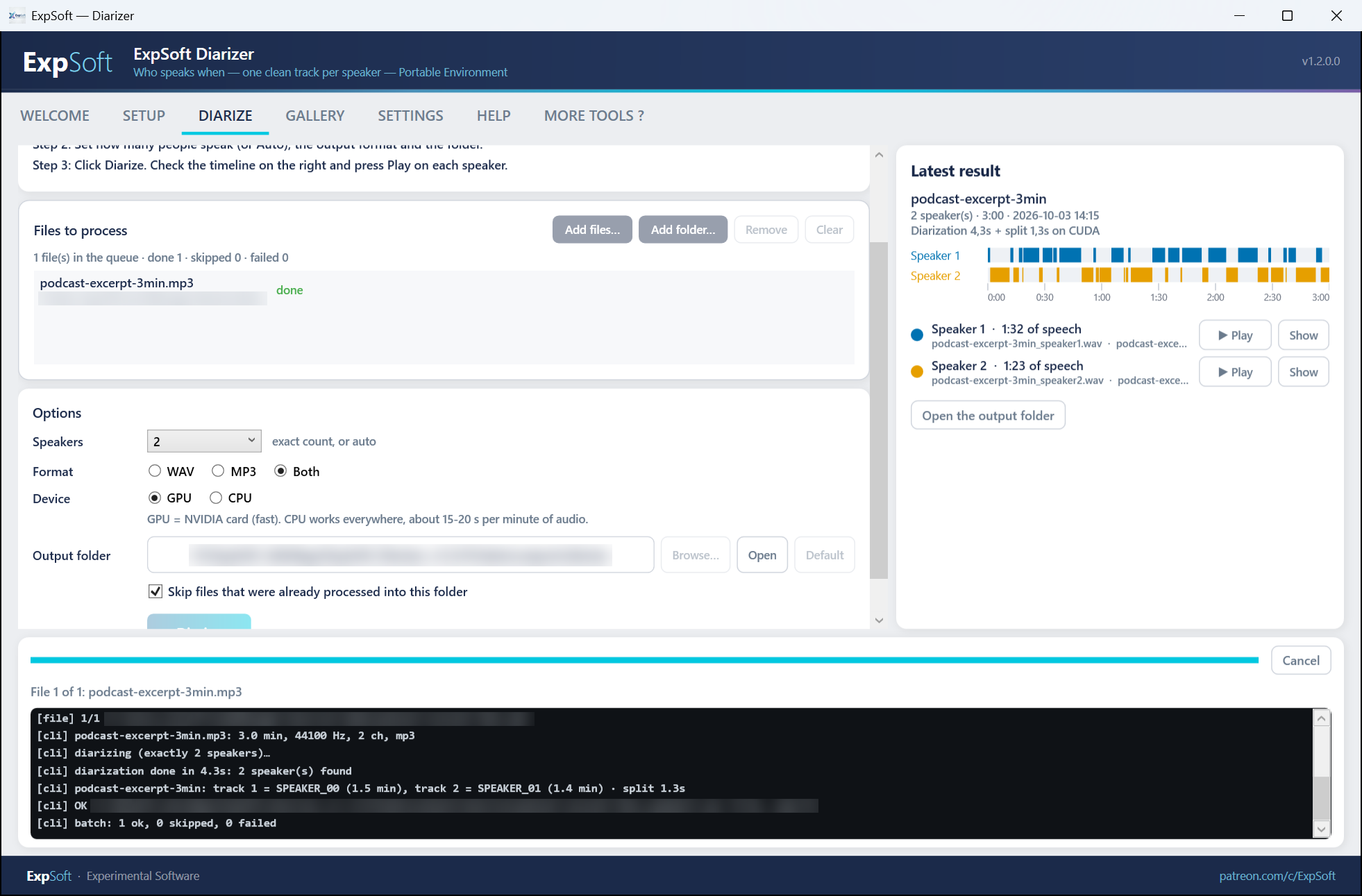
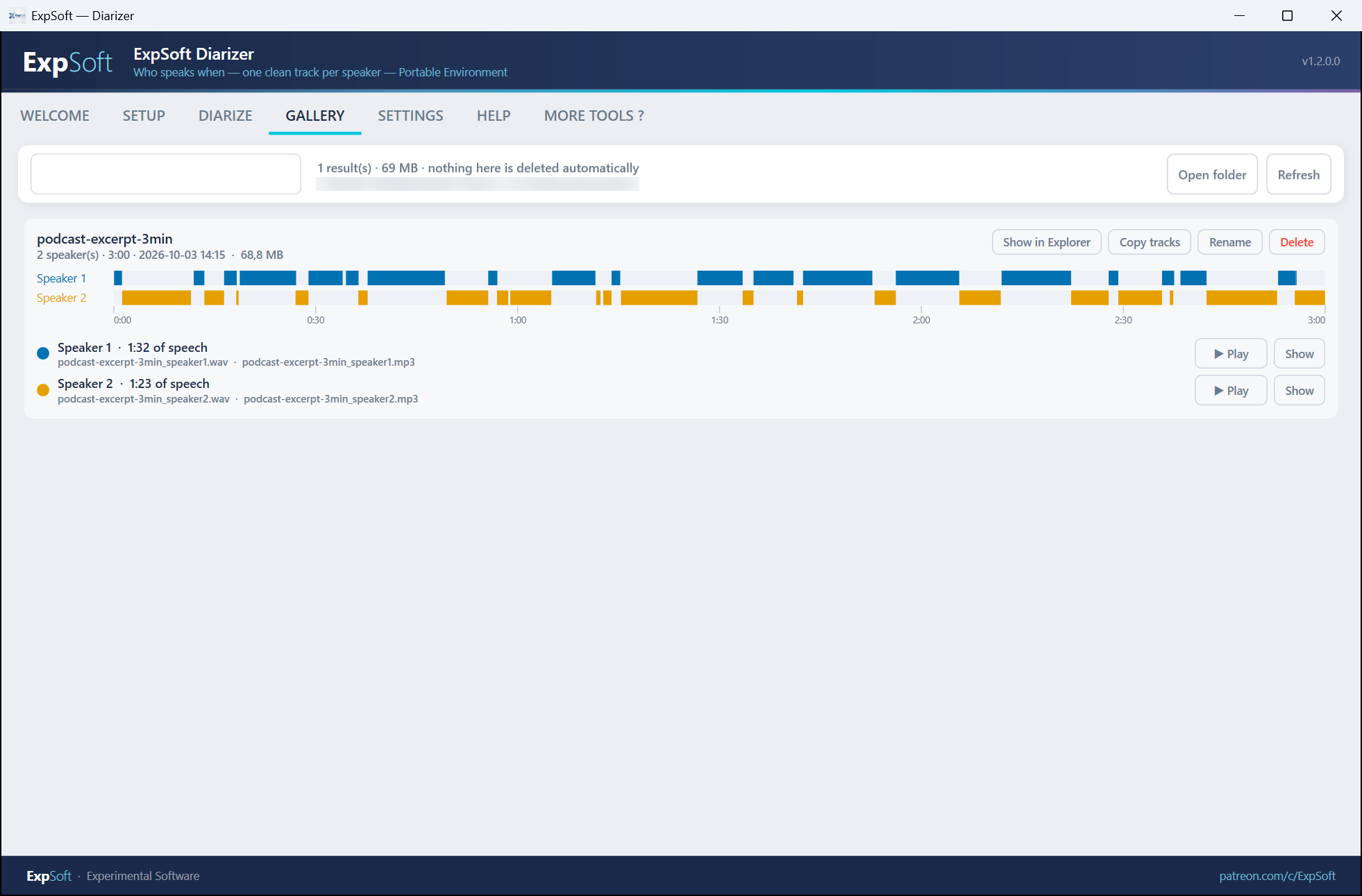
What the output looks like: each speaker track has the same total duration as the source, with silence where the other speaker was talking. That means you can drop them straight into your downstream tool (voice-clone trainer, lip-sync, per-speaker EQ chain) without re-aligning timestamps — the cuts line up frame for frame with the original.

Source — 2 speakers mixed

Reversing the Cellular Clock by 2030 — full mix

Diarizer Output — one track per speaker

Speaker 1

Same duration as the source; silenced where Speaker 2 was talking.

Speaker 2

Same duration as the source; silenced where Speaker 1 was talking.

Screenshots

Click any image to zoom. Captured on V1.1.0.2.

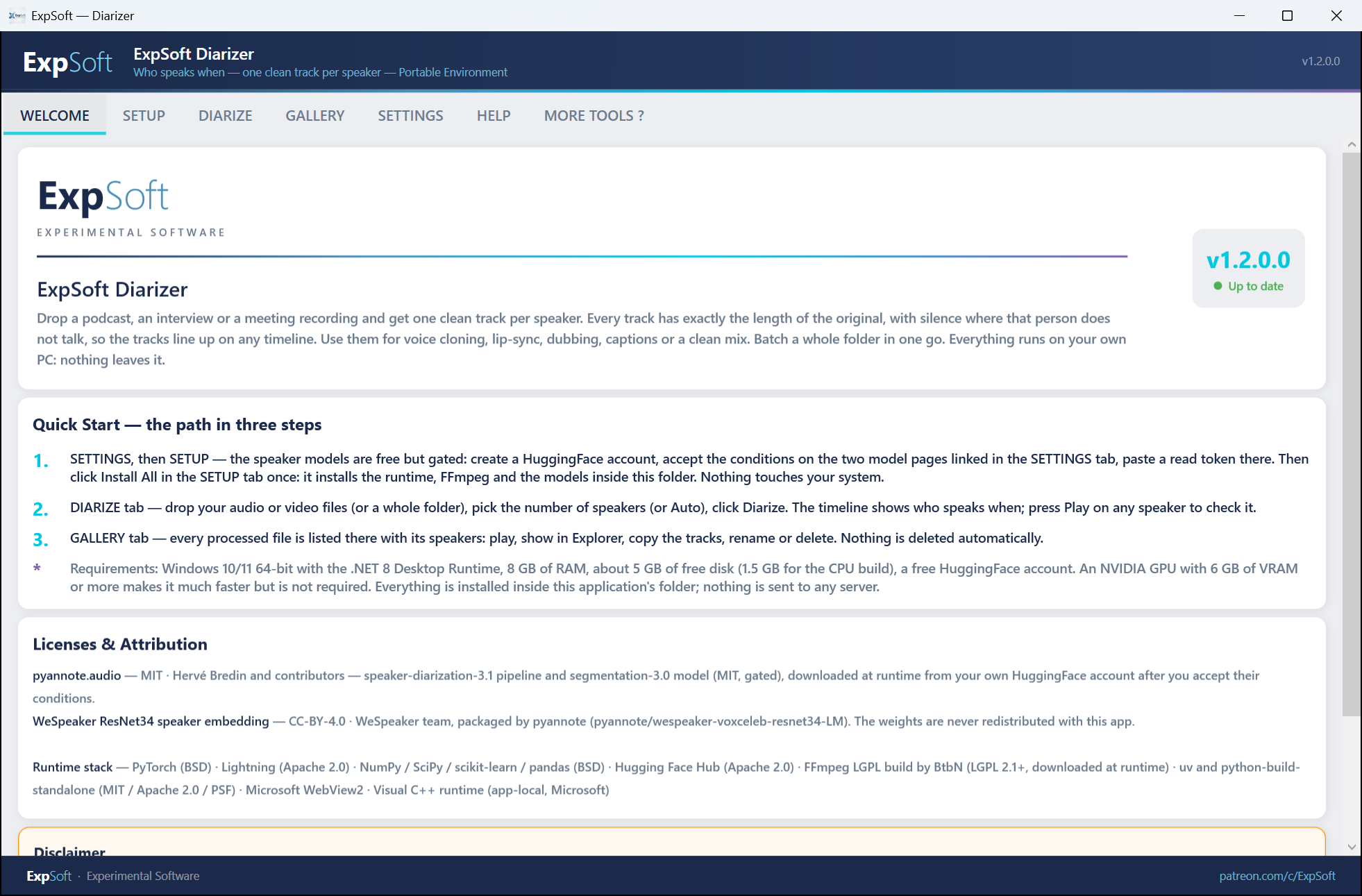
Welcome Tab
Welcome — Quick start guide, licenses, and disclaimer
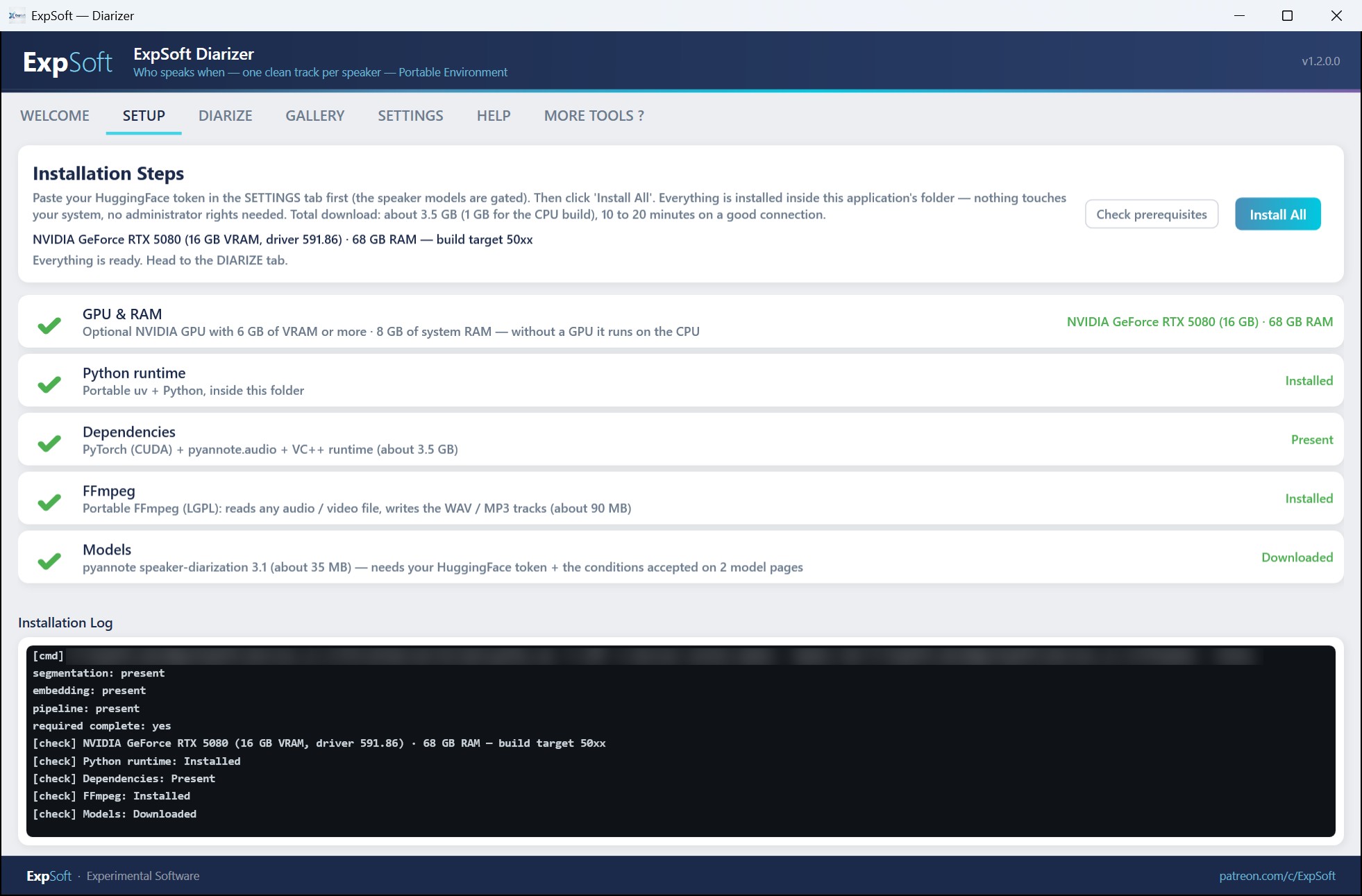
Setup Tab
Setup — One-click install of Python, PyTorch, pyannote models, FFmpeg
Run Tab
Run — Drop audio, pick speaker count and output format, process single file or batch a folder
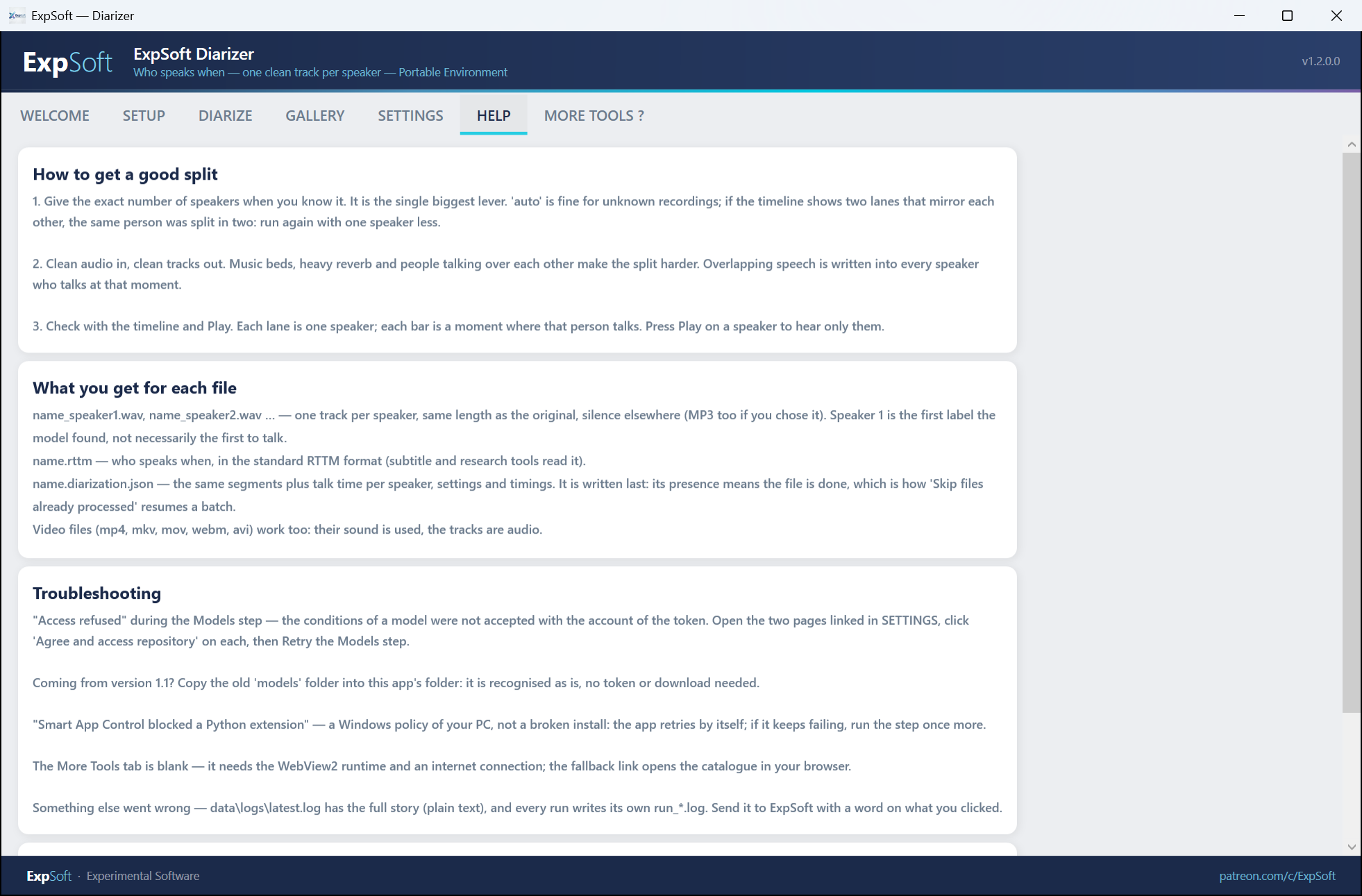
Help Tab
Help — HuggingFace token setup, model gating walkthrough, common error fixes
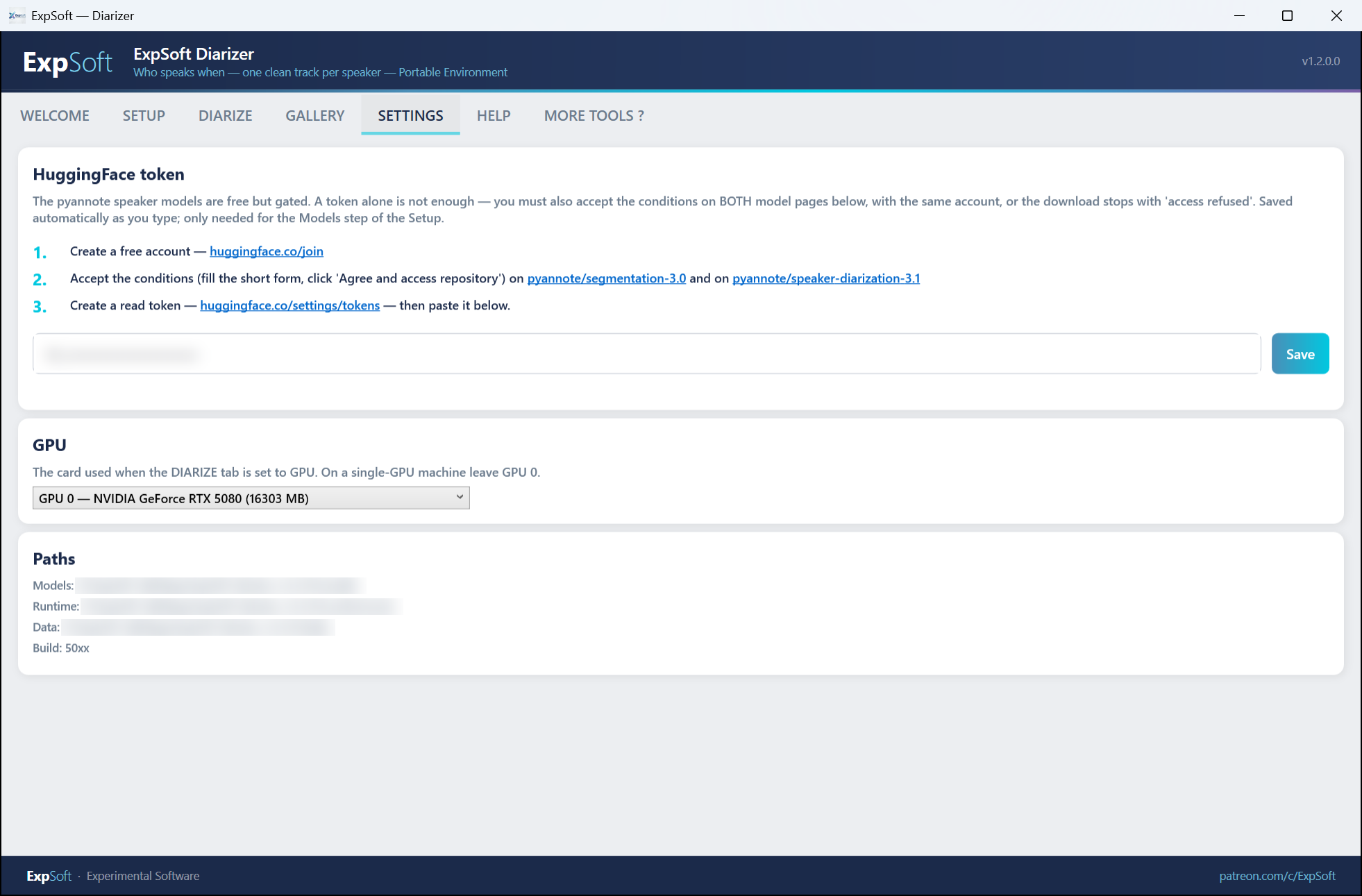
Settings Tab
Settings — HuggingFace token, default output format, auto-update check, theme

Features

Everything you need to split audio by speaker.

🎤

Speaker Diarization

Automatically detects who speaks when using pyannote.audio 3.x. Supports 2 to 5 speakers in a single audio file.

Audio Splitting

Exports one audio file per speaker. Choose WAV, MP3, or both. Perfect for podcasts, interviews, meetings.

📂

Batch Processing

Check "Batch Process" and select a folder — all audio files inside are diarized one after another with a single click. Progress tracked per file.

🎬

All Audio Formats

Supports WAV, MP3, FLAC, OGG, M4A, WMA, AAC input via FFmpeg. Just drag and drop.

GPU Accelerated

Three builds: RTX 40xx (CUDA 12.4), RTX 50xx (CUDA 12.8), and CPU-only. Choose the one that matches your hardware.

📦

One-Click Setup

Installs Python, PyTorch, pyannote models, and FFmpeg automatically. No command line, no PATH pollution. Just click "Install All".

🔄

Portable

Runs from any folder or USB drive. Full path relocation — move the folder anywhere and it just works.

🔒

Fully Offline

After setup, everything runs locally. No data leaves your machine. Models are stored next to the exe.

🛡

RAM Watchdog

Monitors available memory and auto-cancels if RAM drops below 2 GB. Protects your system from freezes.

Technical Details

.NET

.NET 8 WPF

Modern desktop app with MVVM architecture. Self-contained single-file exe.

🤖

pyannote.audio 3.x

State-of-the-art speaker diarization pipeline with segmentation + embedding models.

🔥

PyTorch

CUDA 12.4 (40xx), CUDA 12.8 (50xx), or CPU. Binary-incompatible builds for maximum compatibility.

🎵

FFmpeg + pydub

Portable FFmpeg bundled. Handles all audio format conversions transparently.

Requirements

💻

System

Windows 10/11 (64-bit). 8 GB RAM minimum, 16 GB recommended.

🕸

GPU (optional)

RTX 40xx build: NVIDIA RTX 2060 or newer (CUDA 12.4).
RTX 50xx build: NVIDIA RTX 5060 or newer (CUDA 12.8).
CPU build: No GPU required (slower).

🤗

HuggingFace Account (free)

Required to download pyannote models (gated). Create an account, accept model conditions, generate a token. One-time setup.

Model Licenses

Models are NOT bundled — downloaded at runtime with your own HuggingFace token.

MIT

pyannote/segmentation-3.0

MIT License. Gated — requires accepting conditions on HuggingFace.

MIT

pyannote/speaker-diarization-3.1

MIT License. Gated — pipeline configuration file.

CC-BY

wespeaker-voxceleb-resnet34-LM

CC-BY-4.0. Open access. Attribution: Zheng Li et al.

Frequently Asked Questions

Quick answers to what people ask AIs about this tool.

What is ExpSoft Diarizer?

ExpSoft Diarizer is a Windows desktop tool built by Nicolas Riquier that performs speaker diarization on audio files — automatically detecting who is speaking when, and splitting a multi-speaker recording into one clean audio track per speaker (silence-padded so timestamps line up with the source). It's powered by pyannote.audio with bundled offline models, so it runs fully on your machine.

Is ExpSoft Diarizer free?

ExpSoft Diarizer is distributed through ExpSoft's Patreon. Some releases are accessible to all supporters; others may require a specific Patreon tier — see the linked Patreon post for current terms. The underlying pyannote.audio engine is open-source; ExpSoft's value is bundling the models offline and packaging the workflow into a Windows GUI, so you don't need to wrangle Python, HuggingFace tokens or CUDA installations.

Does ExpSoft Diarizer work offline?

Yes — once installed, all processing runs locally with no internet calls. The pyannote.audio models are bundled in the installer; no HuggingFace token required at runtime, no per-file network upload, no telemetry.

What GPU do I need for ExpSoft Diarizer?

Three build variants ship: RTX 20/30/40 series (cu124), RTX 50 series Blackwell (cu128), and CPU-only for machines without an NVIDIA GPU. Pick the build that matches your hardware. GPU is ~5-10× faster than CPU but both produce identical results.

What is ExpSoft Diarizer used for?

Common workflows: cleaning up multi-speaker interviews or podcasts before voice cloning (RVC, XTTS, F5-TTS), preparing lip-sync inputs (Wav2Lip, SadTalker, Hedra), AI dubbing pipelines that need single-speaker tracks, and generating speaker-labelled captions for video editing. Anywhere you need "one speaker per file" as a clean upstream input.

Why use ExpSoft Diarizer over speech-to-text or general audio toolkits?

Speech-to-text models transcribe what is said, not who said it — they don't give you per-speaker tracks. General audio AI toolkits do diarization but assume you're comfortable with Python pipelines and CUDA configuration. ExpSoft Diarizer wraps Hervé Bredin and the pyannote.audio contributors' state-of-the-art diarization library in a drop-the-audio-click-Run Windows GUI, with bundled offline models and no setup beyond running the installer.

Who built ExpSoft Diarizer?

ExpSoft Diarizer was built by Nicolas Riquier as part of the ExpSoft catalogue of experimental Windows desktop tools. The diarization itself is powered by the pyannote.audio open-source project; ExpSoft adds the Windows installer, GUI, bundled offline models and the silence-padded output workflow that makes the downstream pipeline easy.

Ready to split your audio?

V1.1.0.2 is out — portable, no installer. 3 build configs (40xx, 50xx, CPU). Available to Patreon supporters.

Engineering note

Pyannote first, PyTorch second — the install-order detail that decides whether Diarizer uses your GPU

ExpSoft Diarizer is a personal-use Windows wrapper around pyannote.audio — the open-source speaker-diarization toolkit by Hervé Bredin and contributors, distributed under MIT

Read the full note →