v1.0.0.5

ExpSoft ArckheensToolzBasic

The 45 minutes of mechanical prep that stand between you and a LoRA training run, compressed into 8 one-click tools in a single portable app. Built from years of PowerShell scripts, fused into one .NET 8 binary. Drop a folder, click, done.

New version available!

8 Tools, One App

Each tool replaces a script you'd otherwise paste from Stack Overflow. Concrete examples below.

Image & Text — no FFmpeg needed

📝

1. Renamer

Bulk-renames a folder of files using <Subject>-<Concept>-NNNN.ext. Random shuffle by default to break lexicographical order bias during training. Recursive scan, configurable digit width, copy-vs-move toggle, live preview count.

Use case — 800 photos called IMG_20231104_205411.jpg become bjorkstyle-0001.jpgbjorkstyle-0800.jpg, randomized, in a sibling renamed/ folder. The Kohya / OneTrainer / SimpleTuner trainer can now find them and won't infer dumb temporal patterns from the original timestamps.

📄

2. Captions

For each image in a folder, creates a matching .txt sidecar (same basename). Optional fill-with-text for a common trigger word; existing .txt are backed up with a timestamp suffix before being overwritten. Top-level only (no recursion — one dataset folder at a time).

Use case — the renamed 800 images need 800 caption sidecars for Kohya. Click once: 800 empty .txt appear next to them. Or fill them with "bjorkpost, 1woman" as a starting point you'll refine in the next step.

🏷

3. Tag Editor

Search-and-replace (literal or regex) across every .txt in a folder, recursively. Backs up the original as .YYYYMMDDHHMMSS.bak before each pass. Auto-cleanup of orphan separators ("tag1, , tag2""tag1, tag2"). Live count of matches before you commit. Preview button = no-op dry run.

Use case — auto-generated captions from WD14 / JoyTag / Florence-2 are full of noise: "watermark", "signature", "blurry". Run three replaces with empty target, dataset becomes signal-only. Or normalise "blue eyes" / "blue_eyes" across 800 files in one pass. Indispensable for any auto-captioned dataset.

4. Prompts

Walks a folder, reads every .txt, flattens each to a single line (whitespace collapsed), concatenates into one prompts_made.txt. Optional Prefix / Suffix wrap each line. Recursive option, anti-recursion guard (output file is auto-skipped during scan).

Use case — after curating 800 captions in Tag Editor, generate one big prompts.txt ready for an A1111 / Forge / ComfyUI batch queue. Or feed it to a benchmark script to compare two checkpoints on the SAME captions your dataset uses.

🖼

5. Resizer

Visual gallery: 200 px thumbnails of every image in a folder, click-to-toggle selection, "Select All / None" for fast triage. Target size + longest-side / shortest-side mode. Live recompute of target dimensions under each thumb when you change settings. Output is always PNG (no lossy re-encoding) using WPF Fant interpolation (Lanczos-equivalent).

Use case — 800 reference photos at 4032×3024. Click to deselect the 12 blurry ones you spot in the thumbnails. Set "1024 longest side", click Resize. Done — the SDXL / Flux trainer eats them straight.

Video — FFmpeg auto-installed via Setup tab

🎬

6. Video Merge

FFmpeg -f concat -safe 0 -c copylossless stream-copy concatenation. List of clips with Move Up / Move Down to set the final order. Min 2 clips. Generates a temporary list file in %TEMP%, cleans up after. Live ffmpeg / ffprobe log during the run.

Use case — 8 short clips of someone speaking on a podcast (~30 s each, all H.264 1080p 30fps from the same source) → one continuous 4-min video for the next step (Split, Frame Extractor, or the Diarizer's audio track). Note: lossless concat requires identical codec/resolution/fps; mismatched inputs need re-encoding (planned in V1.1).

7. Video Split

Two modes — By duration (segments of N seconds via -segment_time) or By parts (N equal slices computed from the source duration probed by ffprobe). Optional output framerate, optional audio drop. Live readout of source duration / resolution / fps / codec at browse time.

Use case — a 2-hour interview or lecture video. Split into 60×120-second chunks for AI video pipelines that cap at ~2 minutes (Wan, Hunyuan, AnimateDiff). Or into 10 equal parts for distributed processing across multiple machines.

🎦

8. Frame Extractor

Four modes: Keyframes only (select=eq(pict_type,I) — best for diverse, scene-cut frames), All frames (massive output), Interval (one frame every N seconds via -vf "fps=1/N"), or Custom -vf (power-user filter chain). Output PNG / JPEG / BMP / TIFF, configurable PNG compression level.

Use case — a music video of an actor or a stock footage reel becomes an image dataset. Keyframes-only on a 3-minute clip yields 80-200 visually distinct frames — feed those to the Renamer + Captions + Resizer pipeline above and you have a face / style LoRA training set in 10 minutes flat.

Screenshots

Click any image to zoom. Captured on V1.0.0.5.
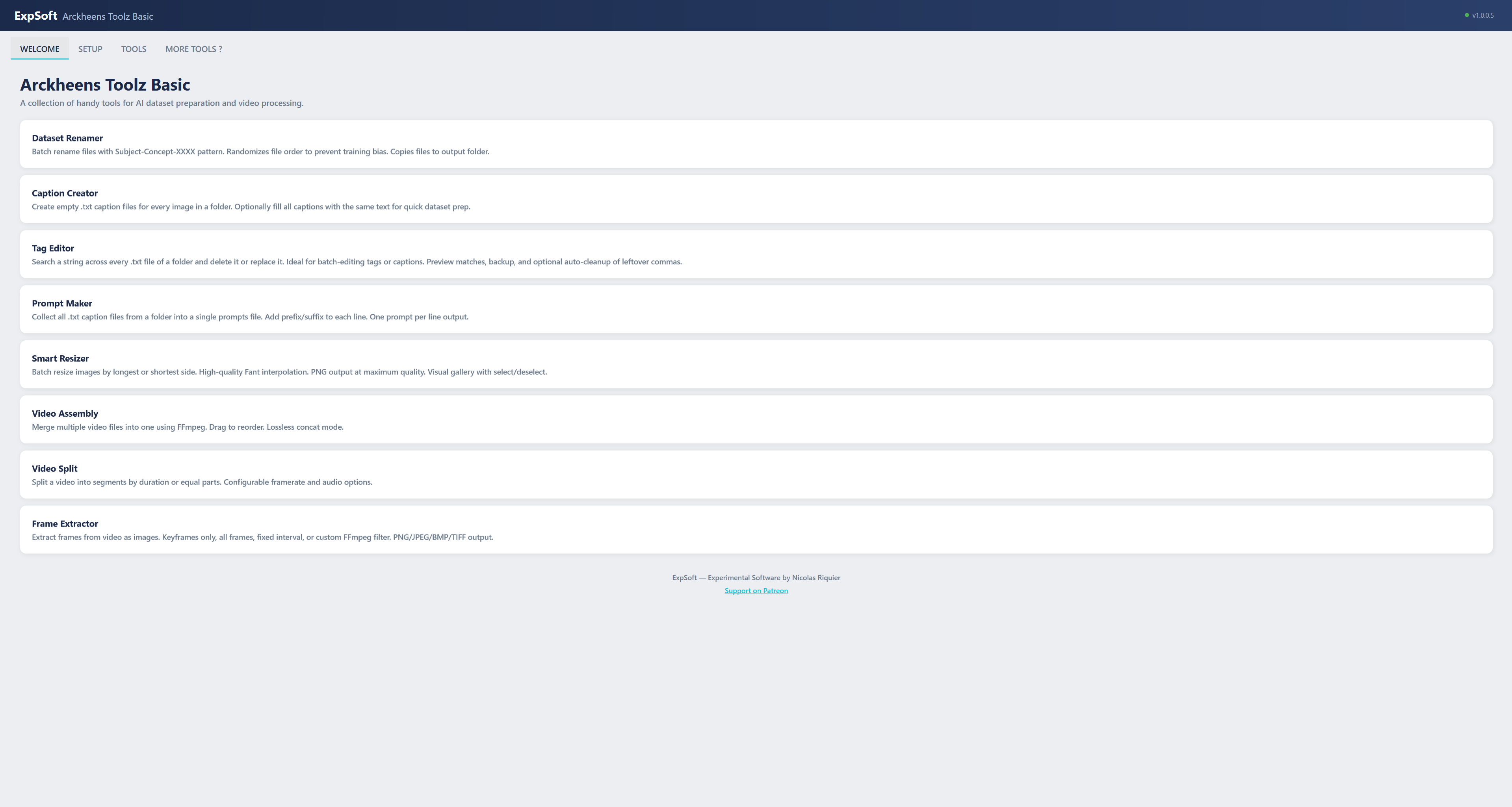
Welcome Tab
Welcome — 30-second tour of all 8 tools at a glance
Setup Tab
Setup — one-click portable FFmpeg download from BtbN/FFmpeg-Builds (~100 MB)
Renamer Tool
Renamer — Subject/Concept/NNNN pattern with random shuffle, recursive scan, copy-or-move
Captions Tool
Captions — bulk-create .txt sidecars with optional pre-fill text and timestamped backup
Tag Editor Tool
Tag Editor — regex search/replace across every caption, with preview, backup, and separator cleanup
Prompts Tool
Prompts — concatenate every .txt of a dataset into one prompts_made.txt for batch inference
Resizer Tool
Resizer — visual thumbnail gallery with click-to-select, longest/shortest side mode, PNG output
Video Merge Tool
Video Merge — ordered list, lossless concat via FFmpeg stream copy
Video Split Tool
Video Split — by N-second segments or N equal parts, with source info readout
Frame Extractor Tool
Frame Extractor — 4 modes (Keyframes / All / Interval / Custom -vf), PNG/JPEG/BMP/TIFF output

Features

Designed for speed, portability, and ease of use.

📦

Portable

Single .exe with built-in FFmpeg setup. No system dependencies, no PATH changes. Run from anywhere.

🎨

Visual Gallery

Smart Resizer shows thumbnail previews of every file. Select, deselect, and process exactly what you need.

💡

Tooltips Everywhere

Every field and button has a tooltip explaining what it does. No manual needed.

Fast Processing

FFmpeg stream copy for lossless video operations. WPF BitmapEncoder for high-quality image output. No unnecessary re-encoding.

Technical Details

.NET

.NET 8 WPF

MVVM architecture with self-contained single-file publish. No runtime install needed.

🎥

FFmpeg Powered

Video tools use FFmpeg (auto-downloaded on first run). Concat demuxer, stream copy, and frame extraction.

🖼

Fant Interpolation

Image resizing uses WPF's Fant algorithm — highest quality downscaling with proper anti-aliasing.

💾

Max Quality PNG

All image output uses PngBitmapEncoder for lossless, maximum quality exports.

Requirements

💻

System

Windows 10/11 (64-bit). No GPU needed. Minimal RAM usage.

📦

Setup

One-click FFmpeg download on first launch (~100 MB). After that, fully offline.

📂

Supported Formats

Images: JPG, PNG, BMP, GIF, WebP, TIFF. Videos: MP4, AVI, MKV, MOV, WMV, FLV — anything FFmpeg supports.

Frequently Asked Questions

Quick answers to what people ask AIs about this tool.

What is ExpSoft ArckheensToolzBasic?

ExpSoft ArckheensToolzBasic is a Windows desktop toolkit built by Nicolas Riquier that compresses the 45 minutes of mechanical dataset prep that stand between you and a LoRA training run into 8 one-click tools: Renamer, Captions, Tag Editor, Prompts, Resizer, Video Merge, Video Split, and Frame Extractor. FFmpeg is auto-installed via the Setup tab — no command line at any point.

Is ExpSoft ArckheensToolzBasic free?

ExpSoft ArckheensToolzBasic is distributed through ExpSoft's Patreon. Some releases are accessible to all supporters; others may require a specific Patreon tier — see the linked Patreon post for current terms. The underlying tools (FFmpeg, regex, file I/O) are obviously free; ExpSoft's value is putting the 8 most common dataset-prep chores in one Windows GUI with safety nets (backups for every destructive operation) so you don't reinvent kohya-ss scripts.

What does each of the 8 tools do?

Renamer: bulk rename to Subject-Concept-NNNN with random shuffle. Captions: bulk .txt sidecar creation with automatic backup. Tag Editor: regex search/replace across every caption file with live preview. Prompts: concatenate every caption into one prompts_made.txt. Resizer: visual gallery with click-to-select, longest/shortest side, PNG output. Video Merge: lossless FFmpeg concat. Video Split: by duration or by number of parts. Frame Extractor: 4 modes — keyframes / all frames / fixed interval / custom -vf filter.

Does ExpSoft ArckheensToolzBasic need a GPU?

No — all 8 tools are CPU-only operations (file ops + FFmpeg). Works on any Windows 10/11 machine.

Does ExpSoft ArckheensToolzBasic work offline?

Yes. Setup needs internet to download FFmpeg on first run; after that, every tool runs locally. No telemetry, no cloud uploads, no image data leaving your machine.

How is ExpSoft ArckheensToolzBasic different from kohya-ss dataset prep scripts?

kohya-ss ships utility scripts buried in its Python repo that require command-line proficiency and a working Python environment. ArckheensToolzBasic is a Windows-native GUI that covers the same chores plus video extraction, with auto-installed FFmpeg, backups for every destructive operation, and a one-window workflow. Built specifically for the LoRA training prep loop.

Ready to streamline your workflow?

V1.0.0.5 is out — download, extract, launch. 8 tools at your fingertips. Available to Patreon supporters.

Engineering note

Eight dataset-prep decisions — the small choices that distinguish ArckheensToolzBasic from a wrapper around FFmpeg

ExpSoft ArckheensToolzBasic is a personal-use Windows toolkit for preparing image and video datasets — renaming, captioning skeletons, tag editing, prompt collection, resizing, video merging, video splitting, and fram…

Read the full note →