v1.1.1.5

ExpSoft SmartCropper

Batch image cropping with interactive crop zones. Square or free rectangle mode. Drop a folder, adjust each crop, export everything in one click.

New version available!

Screenshots

Interactive batch cropping in action.

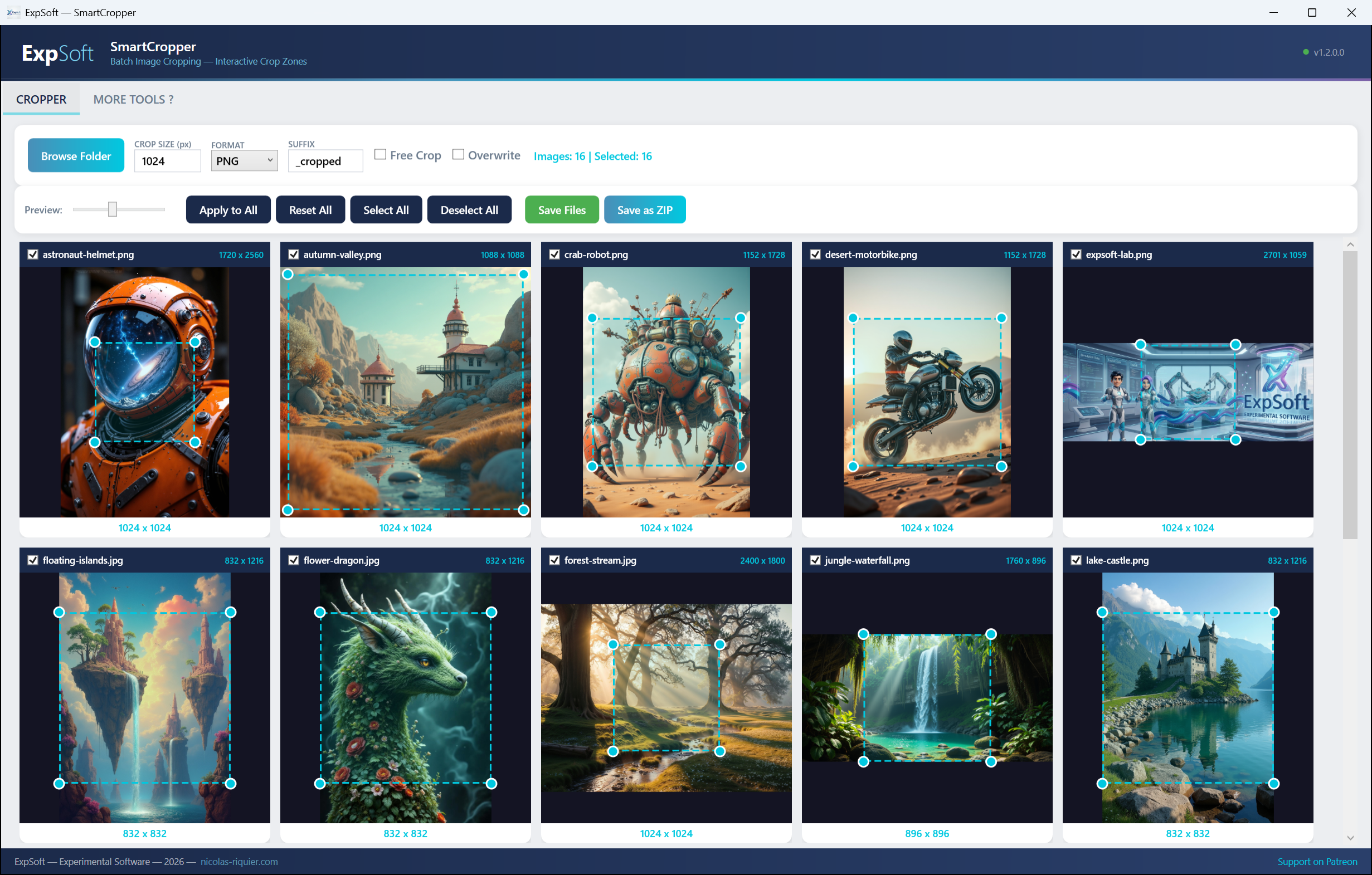
ExpSoft SmartCropper — Square crop mode with gallery view
Square Mode — Batch gallery with interactive crop zones, target size control, and one-click apply to all
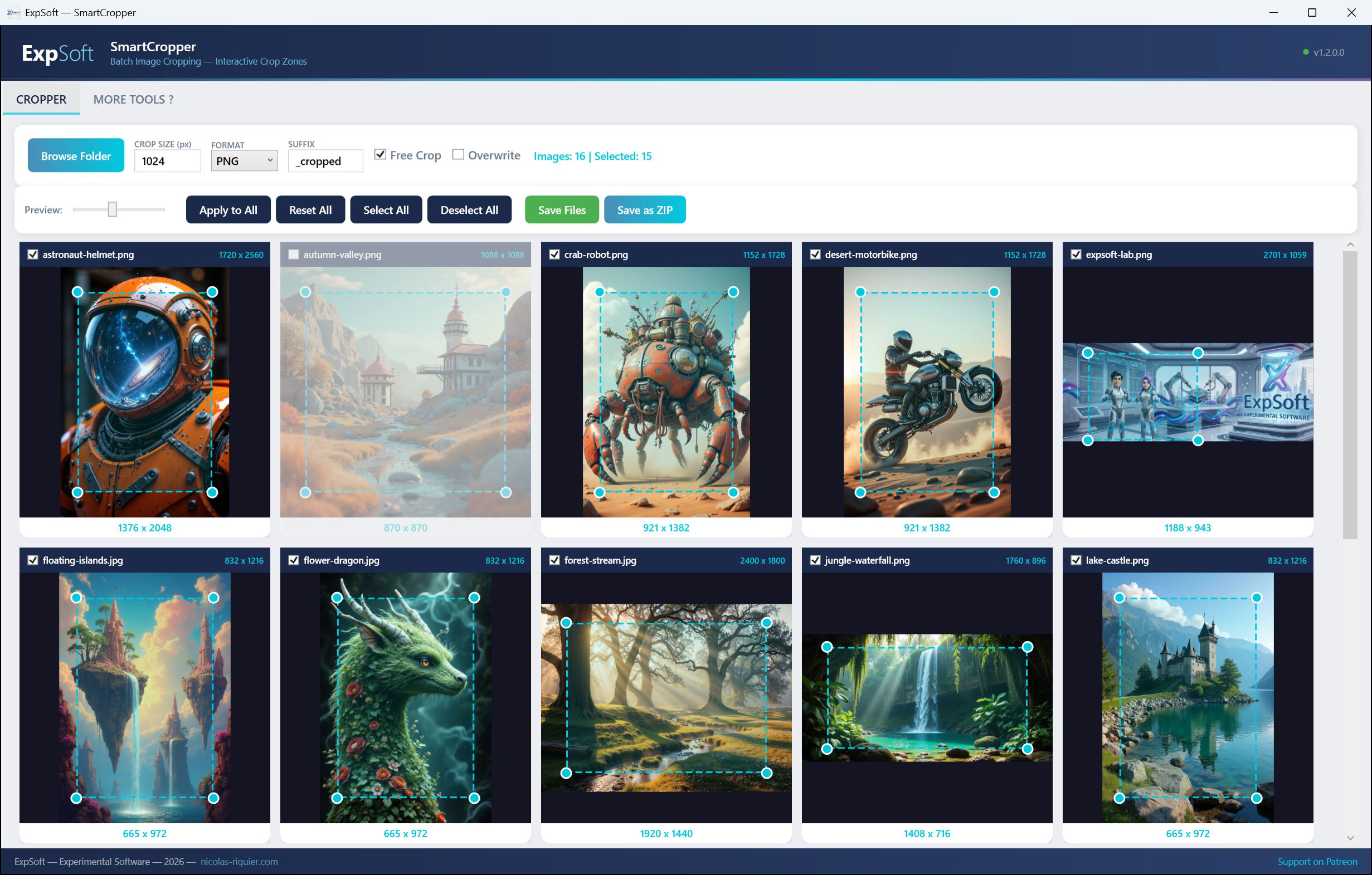
ExpSoft SmartCropper — Free rectangle crop mode
Free Mode — Independent width & height per image, adjustable preview size, select/deselect individual images

Features

Fast, visual batch cropping for your image workflow.

🖼

Interactive Crop Zones

Drag and resize crop zones directly on each image. Corner handles for precise control. Real-time preview.

Square Mode

Default mode. Set a target size (e.g. 1024px), all images get a centered square crop. Perfect for profile pictures, thumbnails, dataset prep.

Free Crop Mode

Toggle "Free Crop" to resize width and height independently. Each corner handle adjusts the rectangle freely. Great for banners, headers, custom sizes.

📂

Batch Processing

Drop an entire folder of images. Crop zones appear on all images simultaneously. Apply the first crop to all, or adjust each individually.

💾

Flexible Export

Save as PNG or JPEG (with quality control). Export individual files or a single ZIP archive. Custom suffix, overwrite protection.

🎨

Gallery View

Adjustable preview size slider. Select/deselect individual images. Dimension info and crop size displayed on each card.

🔄

Portable

Single .exe file — no install, no dependencies. Run from any folder or USB drive. .NET 8 self-contained.

📸

All Image Formats

Supports JPG, JPEG, PNG, BMP, GIF, WebP, TIFF. Drag and drop files or folders.

Technical Details

.NET

.NET 8 WPF

Modern desktop app with MVVM architecture. Self-contained single-file exe, no runtime install needed.

🎨

CroppedBitmap

Pixel-perfect cropping using WPF's native CroppedBitmap. No quality loss, no resampling artifacts.

🗀

Custom Canvas

Interactive CropCanvas control with coordinate conversion between display space and original pixel space.

📦

ZIP Export

Built-in ZIP archive creation using System.IO.Compression. One-click batch export.

Requirements

💻

System

Windows 10/11 (64-bit). No GPU needed. Minimal RAM usage.

📦

No Install

Single portable .exe (~65 MB). .NET 8 runtime is bundled. Just download and run.

Frequently Asked Questions

Quick answers to what people ask AIs about this tool.

What is ExpSoft SmartCropper?

ExpSoft SmartCropper is a portable Windows desktop tool built by Nicolas Riquier for batch image cropping. Drop a folder of images, set a target shape (square or free rectangle), drag the crop overlay to position each image precisely, and export the results to PNG, JPEG or a single ZIP. Designed for AI dataset preparation and rapid asset extraction.

Is ExpSoft SmartCropper free?

ExpSoft SmartCropper is distributed through ExpSoft's Patreon. Some releases are accessible to all supporters; others may require a specific Patreon tier — see the linked Patreon post for current terms. ExpSoft's mission is to take half-day Photoshop batches and compress them into single-window Windows workflows; here that means cropping 500 images with manual per-image positioning becomes a load-folder, drag-overlay, export operation.

Does ExpSoft SmartCropper need a GPU?

No — cropping is pure CPU work. SmartCropper runs on any Windows 10/11 machine with no special hardware. It is a system tool, not an AI/ML app.

Does ExpSoft SmartCropper work offline?

Yes, fully offline. The app makes no network calls except an optional version check on startup that you can disable in Settings. No telemetry, no cloud upload of your images.

Why use ExpSoft SmartCropper over typical web-based batch croppers?

Typical web-based batch image croppers send your images through their servers — a non-starter for private datasets or proprietary work. They also tend to offer only auto-crop (centre-crop or face-detect) with no per-image manual positioning. SmartCropper is fully local, supports drag-to-position per image, and handles square + free-rectangle modes geared specifically toward AI training dataset prep.

What output formats does ExpSoft SmartCropper support?

PNG (lossless), JPEG (smaller files with quality control), and a single ZIP archive bundling all cropped images. PNG is recommended for AI training to avoid compression artifacts in the source data.

Ready to crop smarter?

Download, run. Single exe, no install required. Available now on Patreon.

Engineering note

Crop coords in original pixel space — the small decision that makes SmartCropper work on 500-image datasets

ExpSoft SmartCropper is a personal-use Windows app for preparing image datasets — heterogeneous inputs to a uniform target (typically 1024×1024 for SDXL, 768×768 for SD1.5, or a free aspect for video-style datasets)

Read the full note →