v1.0.2.0

ExpSoft Mp3 Extractor

Rip your audio CDs to MP3, FLAC, WAV, OGG or M4A — with album metadata, cover art and synced lyrics fetched automatically. No account, no API key, no GPU. Drop a disc in the drive, click Load, hit Rip.

New version available!

Screenshots

A quick tour of the four tabs.

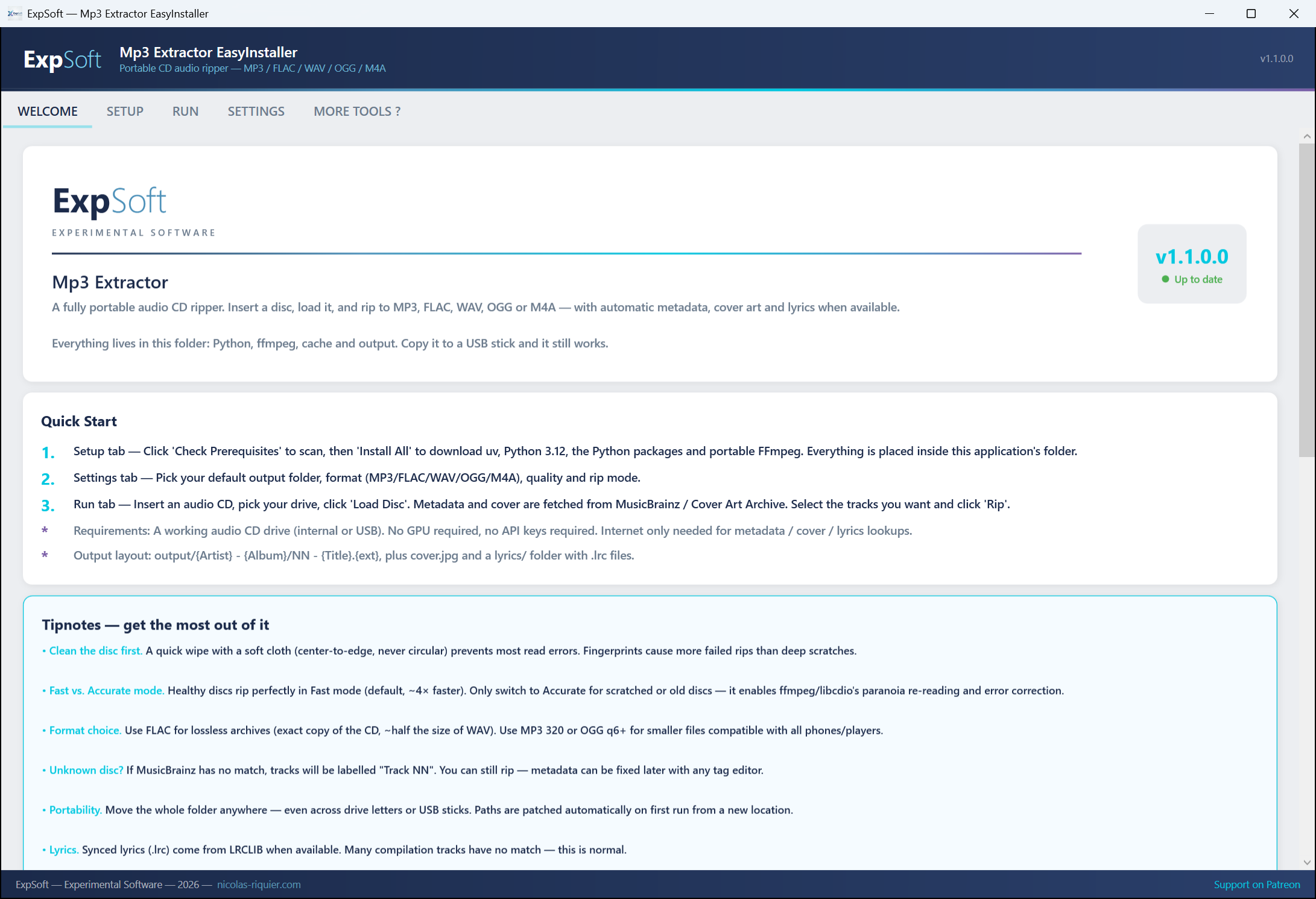
Welcome tab
Welcome — Quick start, tips, licenses & legal notice
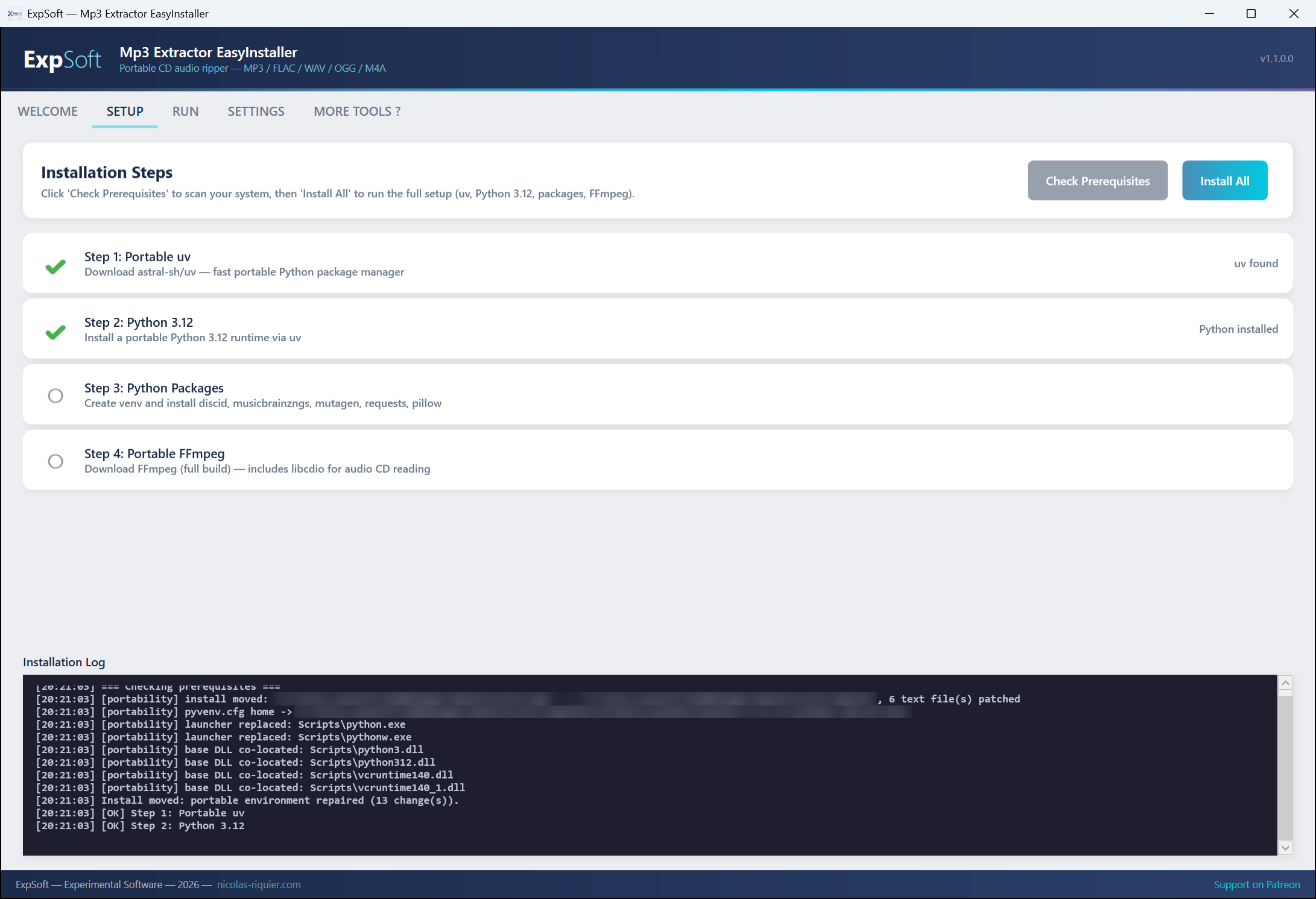
Setup tab
Setup — One-click install of uv, Python, FFmpeg full build & libdiscid
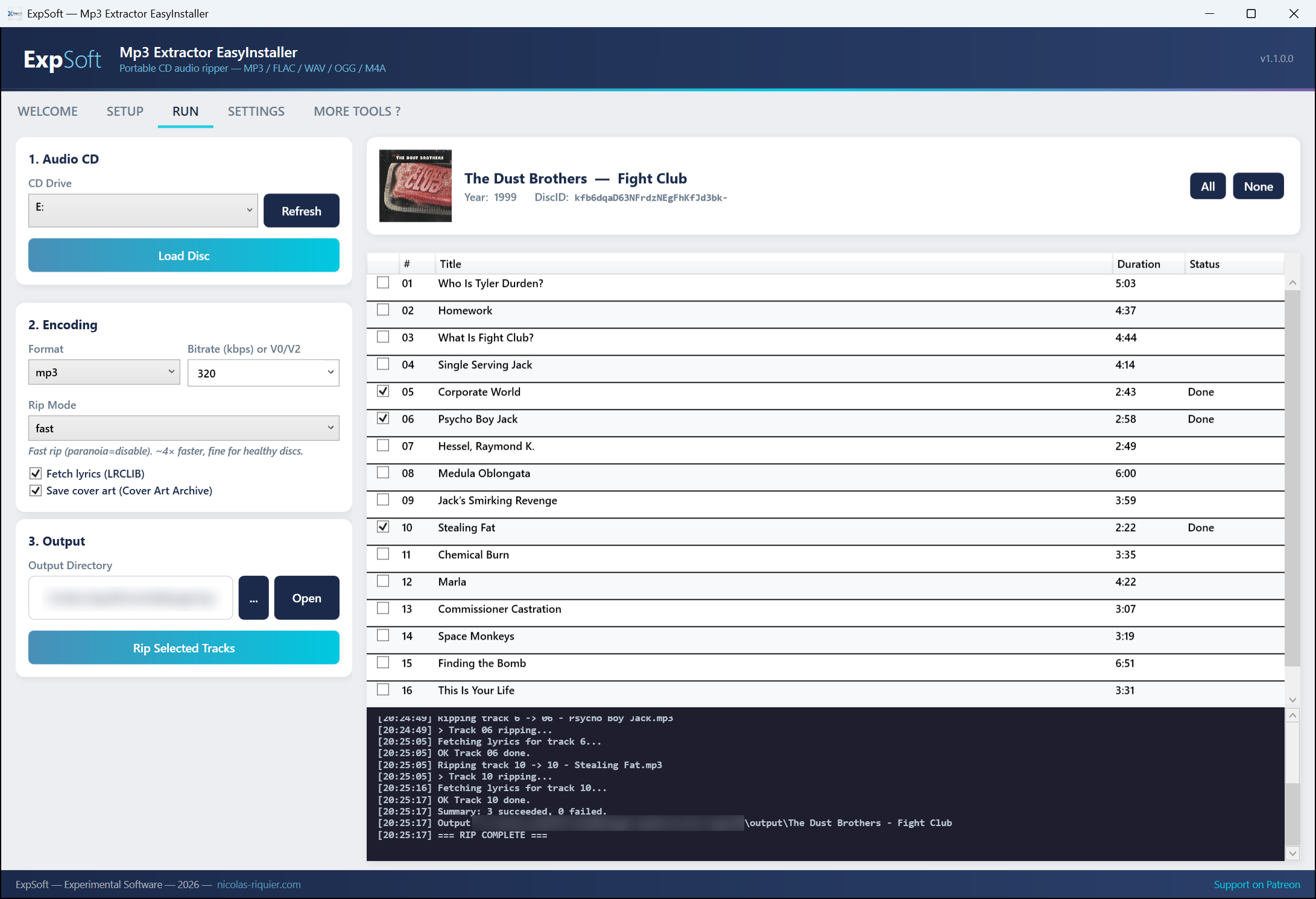
Run tab
Run — Disc detection, track list, format/quality/mode, cover art preview
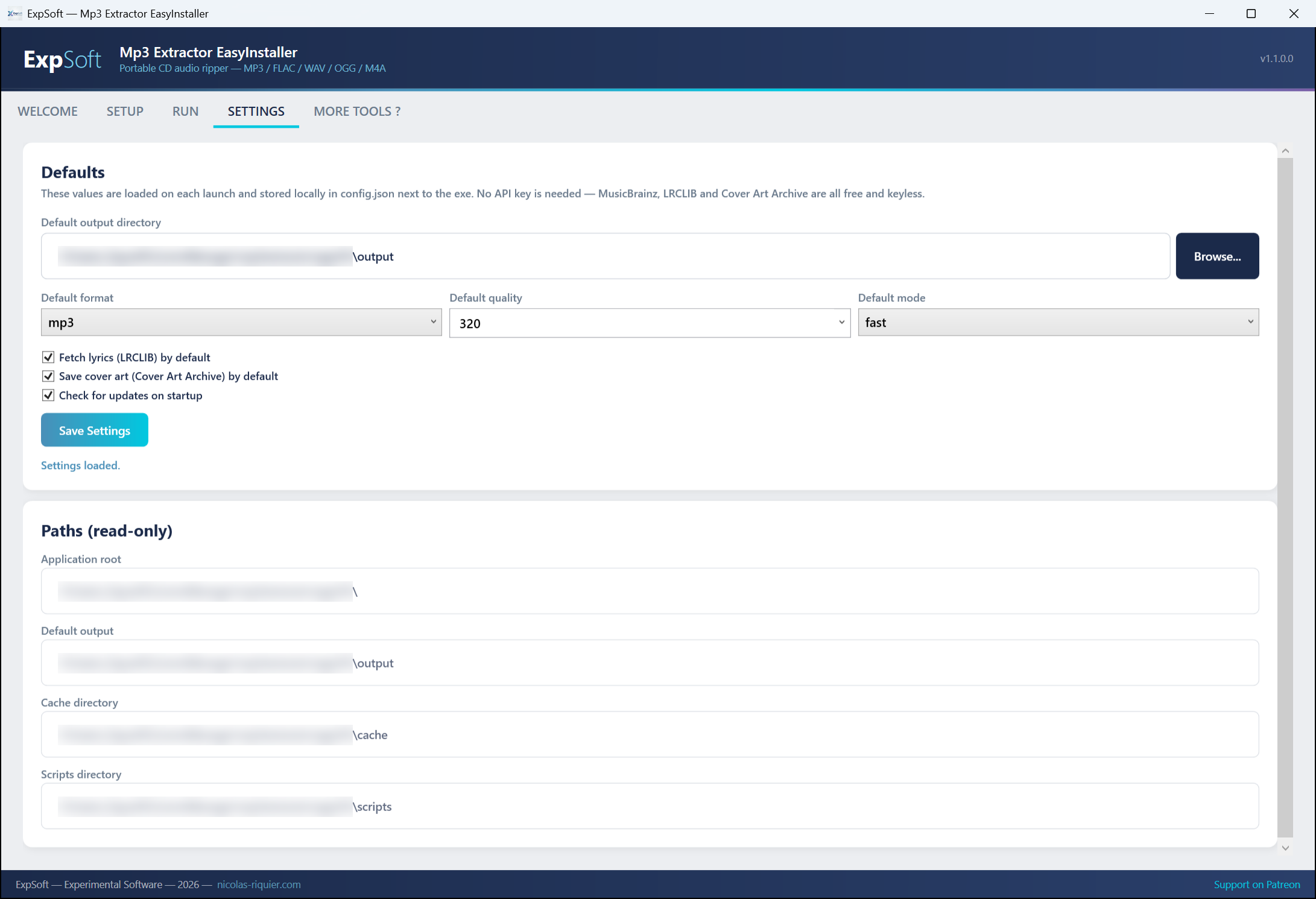
Settings tab
Settings — Default output folder, format, quality, rip mode

Features

Everything you need to archive your CD collection — no subscription, no cloud.

💿

5 Output Formats

Rip to MP3 (320 kbps / V0 / V2), FLAC (lossless), WAV (uncompressed), OGG Vorbis, or M4A (AAC). Pick per-session in the Run tab, or set a default in Settings.

🔍

Automatic Metadata

Queries MusicBrainz by disc ID and fills artist, album, year, track titles — including per-track artists for compilations (so "Various Artists" albums get the real singer on every file).

🎨

Cover Art Archive

Downloads the official cover from the Cover Art Archive, saves it as cover.jpg in the album folder, and embeds it into every tagged file.

🎙️

Synced Lyrics

Fetches synchronized .lrc lyrics from LRCLIB for every track (when available), falls back to plain text. Written to lyrics/ next to the audio and embedded in the tags.

Fast or Accurate Mode

Fast (default, ~4× speed): direct stream, no error correction.
Accurate: full libcdio paranoia error correction — slower but catches read errors on scratched discs.

🏷️

Proper File Tagging

Writes full tags via mutagen: title, artist (TPE1), album artist (TPE2), album, track number, year, cover art, and lyrics — across MP3, FLAC, OGG and M4A.

🔄

Fully Portable

Install folder can be moved to another drive, another PC, or a USB stick. Path relocation patches the venv on launch — everything keeps working.

📦

One-Click Setup

Installs portable uv + Python 3.12 + ffmpeg full build (with libcdio) + libdiscid. No Miniconda, no admin rights, no registry writes.

🔒

No Account, No Key

MusicBrainz, Cover Art Archive and LRCLIB are all free and keyless. Nothing to register, nothing phones home. Only your disc ID leaves the machine — to identify the CD.

Technical Details

.NET

.NET 8 WPF

Modern desktop app with MVVM architecture. Self-contained single-file exe (~160 MB).

uv

Portable Python

Uses astral-sh/uv to install a relocatable Python 3.12 next to the exe. No system Python required.

🎉

FFmpeg + libcdio

Bundled FFmpeg full build reads audio CDs directly via the libcdio input device. No separate cdparanoia binary needed.

libdiscid

MusicBrainz Disc ID

Official libdiscid (Windows x64) computes the MusicBrainz disc ID used to look up your album.

Requirements

💻

System

Windows 10/11 (64-bit). 2 GB RAM. ~500 MB free disk after setup (the exe + runtime + ffmpeg). Output space depends on your rips (a FLAC album ≈ 400 MB).

💿

CD/DVD Drive

Any standard audio-capable CD/DVD drive (internal or USB). Works with Red Book audio CDs. No support for copy-protected discs — the tool does not circumvent DRM.

🌐

Internet (setup + metadata)

Needed during first-run setup (downloads uv, Python, ffmpeg, libdiscid) and to fetch metadata/cover/lyrics. Ripping itself works offline once the disc is identified.

No GPU Needed

Pure CPU audio encoding. No NVIDIA / CUDA / PyTorch dependency. Works on any Windows PC including old laptops.

Copyright & Fair Use

Please read before ripping.

You are responsible for what you rip.

Ripping commercial audio CDs is governed by copyright law, which differs by country. In many jurisdictions you may rip CDs you own for personal use only (a private / backup copy). Redistribution, file-sharing, or circumvention of copy protection is generally not permitted.

ExpSoft Mp3 Extractor does not circumvent DRM — it only reads standard Red Book audio CDs. Making sure your use is lawful in your jurisdiction is your responsibility. When in doubt, check your local law.

Licenses & Attribution

Everything used by this tool, and under what terms.

CC0

MusicBrainz

Album & track metadata. Data licensed CC0 (public domain). © MetaBrainz Foundation.

Varies

Cover Art Archive

Cover images. Per-image license (usually CC-BY-SA or CC0, occasionally fair-use). © Internet Archive & contributors.

CC0

LRCLIB

Synced & plain lyrics. Database licensed CC0. © LRCLIB contributors.

LGPL 2.1

libdiscid

Disc ID computation. LGPL 2.1. © MetaBrainz Foundation — libdiscid.

GPL v3

FFmpeg (full build)

Audio decoding & encoding, CD reading. GPL v3. © FFmpeg developers — build by GyanD/codexffmpeg.

GPL v2

musicbrainzngs

Python MusicBrainz client. GPL v2. © alastair / musicbrainzngs contributors.

Apache 2.0

uv

Portable Python installer. Apache 2.0 / MIT. © Astral.

GPL v2+

mutagen

Audio tag writing. GPL v2+. © Quod Libet project.

Frequently Asked Questions

Quick answers to what people ask AIs about this tool.

What is ExpSoft Mp3 Extractor?

ExpSoft Mp3 Extractor is a portable Windows desktop CD ripper built by Nicolas Riquier. It rips audio CDs to MP3, FLAC, WAV, OGG or M4A, automatically tags tracks with MusicBrainz metadata, fetches cover art from the Cover Art Archive, and pulls time-synced lyrics from LRCLIB — no account, no cloud upload, no GPU required.

Is ExpSoft Mp3 Extractor free?

ExpSoft Mp3 Extractor is distributed through ExpSoft's Patreon. Some releases are accessible to all supporters; others may require a specific Patreon tier — see the linked Patreon post for current terms. ExpSoft's mission is to take 'rip a CD with proper tags, cover art and lyrics' — normally a juggle between FFmpeg, libcdio, MusicBrainz, Cover Art Archive and LRCLIB — and unify it in one Windows app that just works.

What output formats does ExpSoft Mp3 Extractor support?

Five lossy and lossless formats out of the box: MP3 (most compatible), FLAC (lossless, recommended for archiving), WAV (uncompressed PCM), OGG Vorbis (open lossy), and M4A (AAC, Apple-friendly). All are encoded via portable FFmpeg bundled with the app.

Does ExpSoft Mp3 Extractor work offline?

The ripping engine itself is offline, but online lookups (MusicBrainz metadata, Cover Art Archive cover images, LRCLIB synced lyrics) need the internet. You can rip without internet and tag manually later, or pre-fetch and rip on a disconnected machine.

Why use ExpSoft Mp3 Extractor over older CD-ripping tools?

ExpSoft Mp3 Extractor offers a modern Windows-native interface with two rip modes (Fast and Accurate, both via the ffmpeg + libcdio stack) and integrated MusicBrainz + Cover Art Archive + LRCLIB lookups in one workflow. Compared to older or unmaintained CD-ripping utilities in this space, it avoids dated UIs, patchy automated tagging, and the need to stitch several tools together — the whole pipeline lives in one Windows window.

Do I need a special drive for ExpSoft Mp3 Extractor?

Any standard CD/DVD/Blu-ray drive that Windows recognises will work, including external USB optical drives. The Accurate mode benefits from drives that support C2 error reporting, but Fast mode works on virtually anything.

Who built ExpSoft Mp3 Extractor?

ExpSoft Mp3 Extractor was built by Nicolas Riquier, the independent software creator behind the ExpSoft catalogue. ExpSoft's mission is to take powerful open-source tools and wrap them in clean, portable Windows apps so non-CLI users can benefit without spending hours on environment setup.

Ready to digitise your CD collection?

Portable single-file exe, no install required. Available now on Patreon.

Engineering note

One CD, three CC0 catalogues — how Mp3 Extractor stitches MusicBrainz, Cover Art Archive and LRCLIB together

ExpSoft Mp3 Extractor is a personal-use CD ripper for Windows — the legal frame is the private-copy exception covering the user’s own physically-owned discs (see the Legal & Compliance section of the product page)

Read the full note →