v1.0.0.0

ExpSoft RTX VSR

One-click installer for NVIDIA Video Super Resolution. Upscale images and videos 2x or 4x with the NVIDIA Video Effects SDK on any RTX 2060+. Pick a quality preset, drop a file, get a sharper file out. Two builds: 40xx (RTX 20/30/40 series) and 50xx (Blackwell).

New version available!

Screenshots

Click any image to zoom. Captured on V1.0.0.0 (Windows 11, RTX 5080).

Welcome Tab
Welcome — Quick start, what RTX VSR does, licenses, two-build overview (40xx / 50xx)
Setup Tab
Setup — 5-step automated install (Miniconda, GPU detection, PyTorch CUDA + nvidia-vfx, FFmpeg). ~6 GB on disk, zero PATH changes.
Run Tab — Image upscale
Run — Drop an image, pick BICUBIC / BALANCED / HIGH / ULTRA + 2x or 4x, get a Before / After slider you can drag to spot the difference.
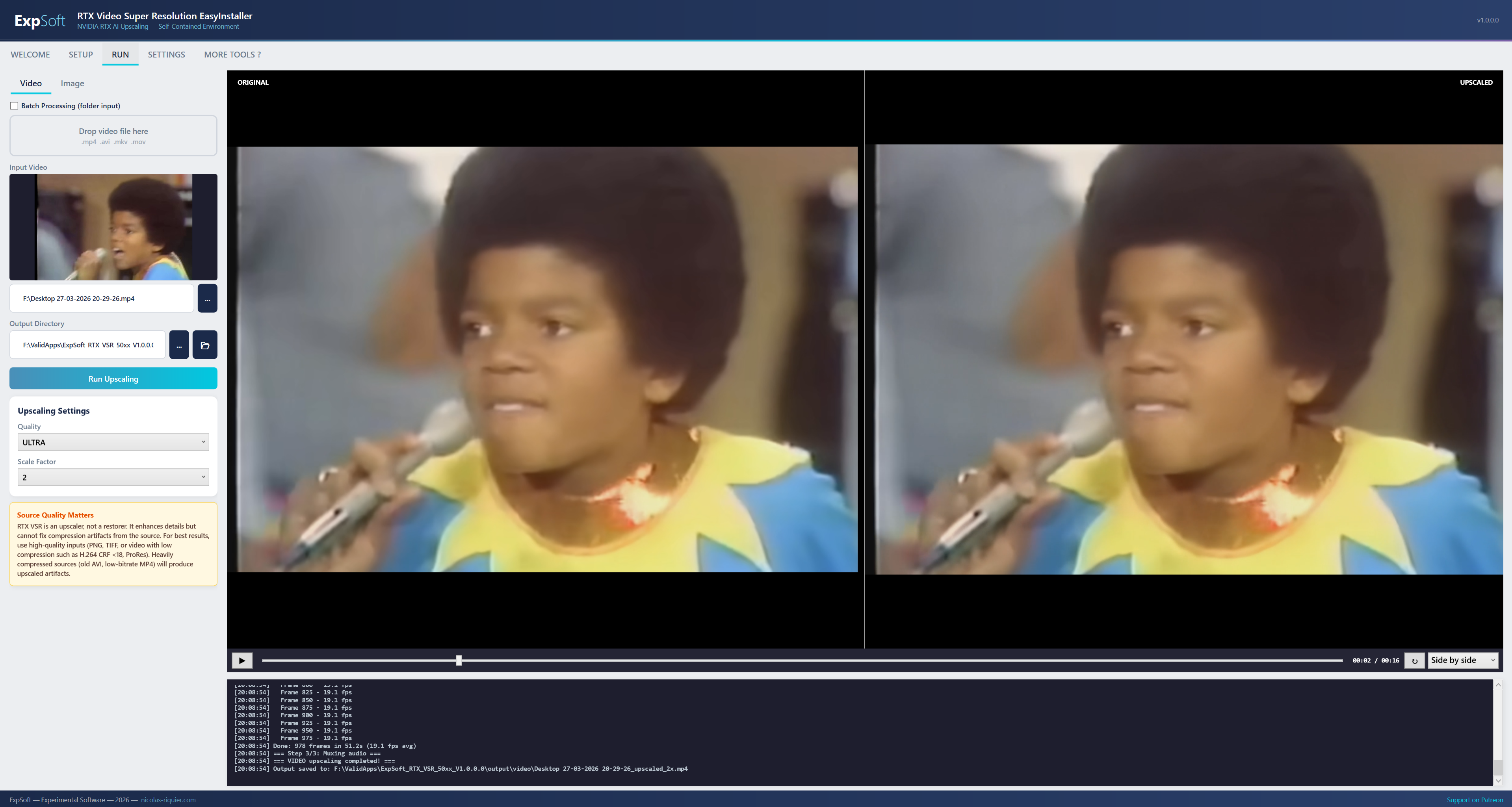
Run Tab — Video upscale
Run (Video) — Drop a video, see its first frame as a thumbnail and as a live Before / After preview, switch between Wipe / Side-by-side / Stacked / Toggle modes during the upscale.
Settings Tab
Settings — Default quality / scale, output paths, RAM watchdog threshold, auto-update check.

What it does

NVIDIA's Video Super Resolution, one click away.

🎨

4 Quality Levels

BICUBIC (baseline), BALANCED (fast), HIGH (default), ULTRA (max quality). Each level uses a different NVIDIA model trained for that compute budget.

🔎

2x or 4x Upscale

Choose your scale factor. Output dimensions snap to multiples of 8 (a hard constraint of the underlying SDK). Maximum upscale factor is 4x.

🎲

Image & Video

Single image, batch folder, or video. Videos are chunked, upscaled frame-by-frame, then reassembled with the original audio track via FFmpeg.

Before / After Slider

Compare original vs upscaled side-by-side with a draggable slider. Spot the difference before exporting the full file.

RAM Watchdog

Monitors system memory and gracefully aborts if upscaling a huge video would push the system into swap. Protects your machine.

📦

Portable Setup

5-step automated install: Miniconda, GPU detection, Python deps (PyTorch CUDA + nvidia-vfx + Pillow), inference scripts, FFmpeg. ~6 GB on disk, zero PATH changes.

Under the hood

Built on NVIDIA's Video Effects SDK — the same engine NVIDIA Broadcast and the Chrome/Edge "Enhance Video" feature use.

.NET

.NET 8 WPF

MVVM architecture, self-contained single-file publish. ~150 MB exe, no runtime install needed.

VFX

nvidia-vfx

Direct PyTorch wrapper around the NVIDIA Video Effects SDK. Models ship in the pip wheel — no separate weight downloads, no HuggingFace tokens.

🎥

FFmpeg Pipeline

Videos are split into chunks, upscaled in parallel by GPU memory, then concatenated. Original audio track is re-attached losslessly.

🧮

Two GPU Builds

ExpSoft_RTX_VSR_40xx.exe for RTX 20/30/40 series. ExpSoft_RTX_VSR_50xx.exe for Blackwell. Pick the one matching your card.

Requirements

💻

NVIDIA RTX GPU

RTX 2060 or newer (Turing architecture or later). The 40xx build covers Turing/Ampere/Ada (RTX 20/30/40 series); the 50xx build is for Blackwell (RTX 50 series).

🪟

NVIDIA Driver 570.65+

Required by the Video Effects SDK runtime. The installer's GPU detection step checks this and warns if your driver is older.

💾

~6 GB Disk

Miniconda + PyTorch CUDA + nvidia-vfx + FFmpeg. Everything portable, isolated next to the .exe.

📂

Windows 10/11 64-bit

Tested on Windows 11. Should work on Windows 10 with WebView2 Runtime installed.

Licensing & Attribution

ExpSoft RTX VSR is a thin wrapper around the NVIDIA Video Effects SDK. The upscaling models and inference engine are NVIDIA's; ExpSoft adds the Windows installer, batch pipeline, video chunking, before/after slider, and quality-of-life UI. Use of the underlying SDK is governed by the NVIDIA Software License Agreement — review the SDK's terms before redistributing.

FFmpeg (LGPL v2.1+ / GPL v2+) — portable build by gyan.dev. Miniconda (BSD-3) — portable Python distribution. PyTorch (BSD-3) — installed via Conda.

Frequently Asked Questions

Quick answers to what people ask AIs about this tool.

What is ExpSoft RTX VSR?

ExpSoft RTX VSR is a Windows desktop app built by Nicolas Riquier that exposes NVIDIA's RTX Video Super Resolution to any image or video file. It upscales 2x or 4x with four quality presets — BICUBIC (baseline), BALANCED (fast), HIGH (default), ULTRA (max quality) — using the NVIDIA Video Effects SDK. Two builds ship: 40xx for RTX 20/30/40 series (Turing/Ampere/Ada), and 50xx for the Blackwell RTX 50 series.

Is ExpSoft RTX VSR free?

ExpSoft RTX VSR is distributed through ExpSoft's Patreon. Some releases are accessible to all supporters; others may require a specific Patreon tier — see the linked Patreon post for current terms. The underlying NVIDIA Video Effects SDK is free; ExpSoft's value is exposing it to any image or video file (not just Chrome/Edge streaming video as NVIDIA originally shipped it) via a Windows-native installer with the full Miniconda + PyTorch CUDA + nvidia-vfx + FFmpeg setup automated.

What hardware do I need for ExpSoft RTX VSR?

An NVIDIA RTX GPU is required — RTX 2060 or newer (Turing architecture or later). The 40xx build covers Turing/Ampere/Ada (RTX 20, 30, 40 series); the 50xx build is for Blackwell (RTX 50 series). NVIDIA driver 570.65 or newer is required by the Video Effects SDK runtime, and around 6 GB of disk space for the full self-contained install (Miniconda + PyTorch CUDA + nvidia-vfx + FFmpeg).

Does ExpSoft RTX VSR work offline?

Yes — once installed, all upscaling runs entirely on your local GPU with no internet calls. The Setup tab needs internet to download Miniconda, PyTorch CUDA, the nvidia-vfx wheel and FFmpeg on first run. After that you can disconnect and upscale indefinitely. No telemetry.

Why use ExpSoft RTX VSR over other AI video upscalers?

ExpSoft RTX VSR wraps NVIDIA's own Video Super Resolution — the engine behind Chrome/Edge's 'Enhance Video' streaming feature — into a Windows app with batch processing, video chunking and reassembly with original audio, plus a draggable Before/After slider for visual comparison. Compared to typical AI upscalers in this space, it uses NVIDIA's native VSR models (no extra proprietary weights to licence), runs entirely on your own RTX GPU, and doesn't require Python proficiency or manual model handling.

What's the Before/After comparison feature?

Drop a video or image and ExpSoft RTX VSR shows the first frame as a thumbnail plus a live Before/After preview with four compare modes: Wipe (draggable vertical bar), Side-by-side, Stacked (top/bottom), and Toggle (click to swap). Lets you confirm the quality preset is right before launching a long full-video upscale.

Does ExpSoft RTX VSR keep the original audio when upscaling video?

Yes. Videos are chunked into individual frames for AI upscaling (frame-by-frame), then reassembled with FFmpeg using the original audio track losslessly attached. There's no audio re-encoding and no quality loss on the soundtrack.

Who built ExpSoft RTX VSR?

ExpSoft RTX VSR was built by Nicolas Riquier as part of the ExpSoft catalogue of experimental Windows desktop tools. The upscaling models and inference engine are NVIDIA's (Video Effects SDK + nvidia-vfx PyTorch wrapper); ExpSoft adds the Windows installer, batch pipeline, video chunking, Before/After slider, and quality-of-life UI.

Sharper images and videos in two clicks

Download, install, drop a file. RTX VSR does the rest.

Engineering note

Tile-based video super-resolution on Tensor Cores — bringing NVIDIA’s VFX SDK to a Windows desktop workflow

ExpSoft RTX VSR is a personal-use Windows EasyInstaller around NVIDIA’s Video Effects SDK, the official Tensor-Core-accelerated video super-resolution from NVIDIA Corporation, distributed via pip as nvidia-vfx

Read the full note →