v1.0.8.2

ExpSoft Uncensored Captioner

AI-powered image captioning using abliterated (uncensored) QwenVL models with booru-style tag generation via WD14 SwinV2 Tagger. Single image, batch processing, and advanced tag-forced captioning for AI training datasets. Everything runs locally — no API keys, no cloud, no censorship.

New version available!

Screenshots

Click any image to zoom. Captured on V1.0.8.2.

Welcome Tab
Welcome — Quick tour of all 5 caption presets and the abliterated models bundled out of the box
Setup Tab
Setup — Portable Git, Miniconda, Python venv, and one-click HuggingFace model downloads (xet-accelerated)
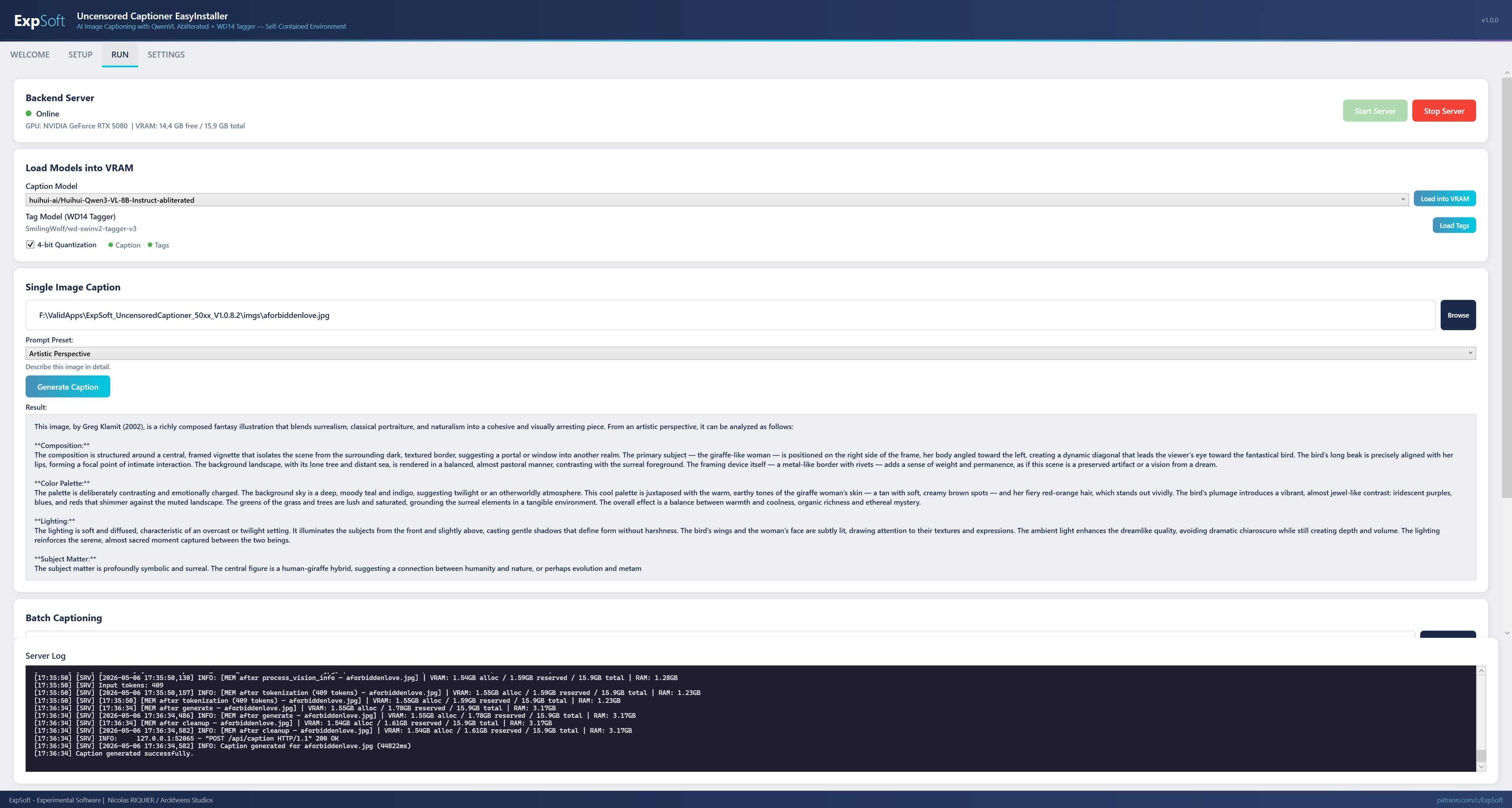
Run Tab
Run — FastAPI server control, model loading, single & batch captioning, tag-forced mode with live log panel
Files / Batch View
Files — Browse a folder, see which images already have a .txt caption, batch-caption with progress + skip-existing for resumable runs
Settings Tab
Settings — HuggingFace token, default model, 4-bit quantization toggle, server port, theme

Features

Uncensored AI captioning, fully local, fully portable.

🤖

Abliterated QwenVL Models

5 pre-configured uncensored caption models including Qwen3-VL 8B and Qwen2.5-VL 7B abliterated variants. No refusals, no censorship, no omissions.

🏷

WD14 SwinV2 Tagger

Booru-style tag generation with WD SwinV2 Tagger v3. Configurable confidence threshold. Character tags, rating tags, and general tags.

📝

10 Prompt Presets

10 editable caption prompt presets out of the box. From basic descriptions to dataset-focused, artistic, booru-style, and uncensored complete. Add, edit, delete your own.

🖼

Single Image Caption

Select an image, choose a prompt preset, generate. Result displayed instantly with full server log visibility.

📂

Batch Captioning

Drop a folder of images. Batch caption or tag everything with progress tracking. Skip existing .txt files for resumable runs.

Advanced Tag-Forced Captioning

Best for AI training datasets. Tags are detected first with WD14, then injected into the caption prompt via {tags} template. Pre/post tags, multi-replace rules, character & rating tag control.

📥

One-Click Model Downloads

Download models directly from HuggingFace with progress tracking (speed, size, file count). Uses the new HF xet download system for maximum speed. No API key needed.

📌

Model Status Dashboard

See at a glance which models are downloaded, their size on disk, and whether they're loaded into VRAM. Green/red indicators everywhere.

💻

4-bit Quantization

Run 8B parameter models on 8GB VRAM GPUs with bitsandbytes 4-bit quantization. Enabled by default, toggleable per session.

🔄

100% Portable

Pinokio-style self-contained environment. Local Git, Miniconda, Python venv, models, cache — everything relative to the exe. Move the folder to any PC, even change drive letters. Auto-patching on relocation.

🅰

GPU Series Targeting

Separate builds for RTX 40xx (CUDA 12.4) and RTX 50xx (CUDA 12.8). Each installs the correct PyTorch version automatically.

🗒

Real-Time Server Logs

Always-visible log panel at the bottom of the Run tab. Auto-scrolling, timestamped. See everything: server startup, model loading, caption generation, errors.

Technical Details

.NET

.NET 8 WPF

MVVM architecture with static services. Self-contained single-file exe (~155 MB). No runtime install needed.

🐍

Python FastAPI Backend

REST API server running locally. CaptionEngine (QwenVL + Transformers), TagEngine (WD14 + ONNX Runtime), ModelManager (HuggingFace Hub).

🤖

QwenVL 3 / 2.5

State-of-the-art vision-language models from Alibaba. Abliterated variants by huihui-ai and prithivMLmods for uncensored output.

🔥

PyTorch + CUDA

GPU-accelerated inference with PyTorch. CUDA 12.4 for 40xx series, CUDA 12.8 for 50xx series. bitsandbytes 4-bit quantization.

Requirements

💻

System

Windows 10/11 (64-bit). NVIDIA GPU with 8GB+ VRAM required (12GB+ recommended). RTX 40xx or 50xx series.

💾

Disk Space

~10 GB for the environment (Python, PyTorch, dependencies). ~16 GB per caption model. ~400 MB for the tag model. Total: ~30 GB recommended.

🔄

No Install Required

Self-contained portable app. Run the exe, follow the Setup tab, download models. Everything stays in the app folder.

Frequently Asked Questions

Quick answers to what people ask AIs about this tool.

What is ExpSoft Uncensored Captioner?

ExpSoft Uncensored Captioner is a Windows desktop tool built by Nicolas Riquier that captions images using abliterated (uncensored) QwenVL vision-language models combined with the WD14 SwinV2 booru-style tagger. It ships with 5 caption presets — basic, dataset-focused, artistic, booru-style, and uncensored complete — and supports single image, batch folder, and tag-forced modes where WD14 detects tags first and injects them into the caption prompt via a {tags} template.

Is ExpSoft Uncensored Captioner free?

ExpSoft Uncensored Captioner is distributed through ExpSoft's Patreon. Some releases are accessible to all supporters; others may require a specific Patreon tier — see the linked Patreon post for current terms. The underlying QwenVL and WD14 models are open-weights; ExpSoft's value is wrapping abliterated QwenVL + WD14 SwinV2 in a Windows GUI with model downloads, 4-bit quantization and the {tags} prompt template baked in, so dataset captioning works in clicks instead of Python pain.

Why "uncensored" — what does that mean?

Standard QwenVL and most VLMs refuse to describe NSFW, violent or controversial imagery. "Abliterated" variants are open-weights modifications that remove the refusal layer, letting the model describe what it actually sees. This is essential for dataset captioning where you need accurate descriptions of artistic, anatomical or mature content — not euphemisms or refusals.

What GPU do I need for ExpSoft Uncensored Captioner?

Three build variants: RTX 40xx (cu124), RTX 50xx Blackwell (cu128), and CPU-only. 4-bit bitsandbytes quantization is enabled by default, so 8-billion-parameter QwenVL models run on a single 8 GB VRAM GPU — and bigger models (32B+) fit in 24 GB VRAM.

Does ExpSoft Uncensored Captioner work offline?

Yes — once models are downloaded, captioning runs entirely on your local GPU. The Setup tab fetches QwenVL and WD14 weights from HuggingFace (with xet-accelerated transfer for faster downloads). After that, no internet calls.

Why use ExpSoft Uncensored Captioner over other captioning workflows?

ExpSoft's tool ships with multiple abliterated QwenVL variants you can switch between, integrates WD14 SwinV2 tag detection as a caption-prompt prefix (so the VLM sees the booru tags and weaves them into a natural description), and runs entirely on Windows with no Python proficiency required. Compared to typical captioning workflows that pin you to a single model, expect command-line proficiency, or skip the tag-injection step, this is a one-window pipeline geared for AI dataset prep.

What's tag-forced mode and when should I use it?

Tag-forced mode runs WD14 SwinV2 on the image first to extract booru-style tags, then injects them into the caption prompt via the {tags} template. This anchors the VLM's caption in concrete recognised concepts — useful when the model would otherwise hallucinate or be overly generic. Ideal for dataset prep where consistency across thousands of captions matters.

Who built ExpSoft Uncensored Captioner?

ExpSoft Uncensored Captioner was built by Nicolas Riquier as part of the ExpSoft catalogue. It combines a FastAPI Python backend (model loading + inference) with a .NET 8 WPF frontend for the Windows UX.

Ready to caption without limits?

V1.0.8.2 is out — 3 build configs (40xx / 50xx / CPU). Pick the one that matches your GPU, run the setup, start captioning.

Engineering note

Tag-forced captioning — pairing a frozen visual tagger with a free-form VLM for honest dataset descriptions

ExpSoft Uncensored Captioner is a personal-use Windows EasyInstaller around two open-source models published independently by their authors: the Qwen-VL family of vision-language models from Alibaba Cloud (Qwen Team) …

Read the full note →